Appearance
支持单元格模板样式
单元格模板样式是值单元格类型提前配置好的一组样式以方便使用者配置或复用。如下图
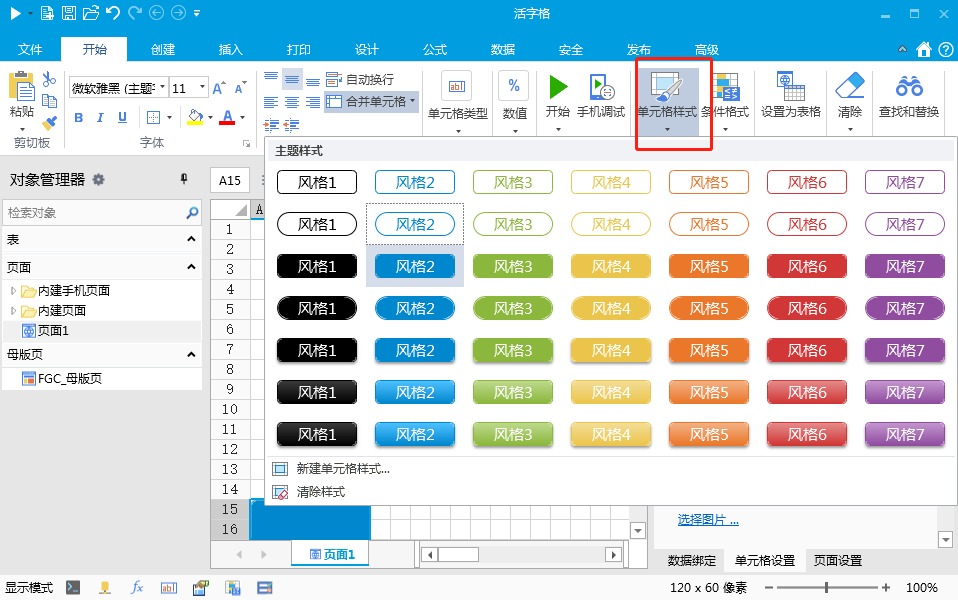
单元格插件可以通过实现 IStyleTemplateSupport 接口和自定义 CellTypeStyleTemplateSupportAttribute 来实现
修改MyPluginCellType.cs文件
csharp
using GrapeCity.Forguncy.CellTypes;
using GrapeCity.Forguncy.Plugin;
using System;
using System.Collections.Generic;
using System.ComponentModel;

namespace MyPlugin
{
    [Icon("pack://application:,,,/MyPlugin;component/Resources/Icon.png")]
    [Designer("MyPlugin.Designer.MyPluginCellTypeDesigner, MyPlugin")]
    [MyPluginStyleTemplateSupport]
    public class MyPluginCellType : CellType, IStyleTemplateSupport
    {
        public string TemplateKey { get; set; }
    }

    public class MyPluginStyleTemplateSupportAttribute : CellTypeStyleTemplateSupportAttribute
    {
        public override List<TemplatePart> TemplateParts => new List<TemplatePart>() { new TemplatePart()
        {
            Name= "主体",
            SupportStates = CellStates.Normal | CellStates.Hover | CellStates.Active,
            SupportStyles = SupportStyles.BackgroundColor | SupportStyles.ForegroundColor | SupportStyles.RoundedCorner | SupportStyles.Border | SupportStyles.Opacity
        }};

        public override List<CellTypeStyleTemplate> PresetTemplates => new List<CellTypeStyleTemplate>()
        {
            new CellTypeStyleTemplate()
            {
                Key = "主要",
                Category = "预置样式",
                Styles = new Dictionary<string, TemplatePartStyle>()
                {
                    {
                        "主体", new TemplatePartStyle()
                        {
                            NormalStyle = new PartStyleUnit()
                            {
                                Background = "Accent 1",
                                FontColor = "Background 1",
                                BorderRadiusString = "4px 4px 4px 4px"
                            },
                            HoverStyle = new PartStyleUnit()
                            {
                                Background = "Accent 1 20"
                            },
                            ActiveStyle = new PartStyleUnit()
                            {
                                Background = "Accent 1 -20"
                            },
                        }
                    }
                }
            },
            new CellTypeStyleTemplate()
            {
                Key = "成功",
                Category = "预置样式",
                Styles = new Dictionary<string, TemplatePartStyle>()
                {
                    {
                        "主体", new TemplatePartStyle()
                        {
                            NormalStyle = new PartStyleUnit()
                            {
                                Background = "Accent 2",
                                FontColor = "Background 1",
                                BorderRadiusString = "4px 4px 4px 4px"
                            },
                            HoverStyle = new PartStyleUnit()
                            {
                                Background = "Accent 2 20"
                            },
                            ActiveStyle = new PartStyleUnit()
                            {
                                Background = "Accent 2 -20"
                            },
                        }
                    }
                }
            },
            new CellTypeStyleTemplate()
            {
                Key = "错误",
                Category = "预置样式",
                Styles = new Dictionary<string, TemplatePartStyle>()
                {
                    {
                        "主体", new TemplatePartStyle()
                        {
                            NormalStyle = new PartStyleUnit()
                            {
                                Background = "Accent 5",
                                FontColor = "Background 1",
                                BorderRadiusString = "4px 4px 4px 4px"
                            },
                            HoverStyle = new PartStyleUnit()
                            {
                                Background = "Accent 5 20"
                            },
                            ActiveStyle = new PartStyleUnit()
                            {
                                Background = "Accent 5 -20"
                            },
                        }
                    }
                }
            },
            new CellTypeStyleTemplate()
            {
                Key = "取消",
                Category = "预置样式",
                Styles = new Dictionary<string, TemplatePartStyle>()
                {
                    {
                        "主体", new TemplatePartStyle()
                        {
                            NormalStyle = new PartStyleUnit()
                            {
                                BorderRadiusString = "4px 4px 4px 4px",
                                BorderString = "1px solid Background_1_60",
                            },
                            HoverStyle = new PartStyleUnit()
                            {
                                Background = "Background 1 -25"
                            },
                            ActiveStyle = new PartStyleUnit()
                            {
                                Background = "Background 1 -15"
                            },
                        }
                    }
                }
            }
        };

        public override string DefaultTemplateKey => "主要";
    }
}
代码说明
- MyPluginStyleTemplateSupportAttribute 文件中,通过TemplateParts可以定义一个或者多个部分的样式设置,本里中假设有一个部分,取名为“主体”
- 通过TemplateParts 可以定义单元格支持的状态已经支持的具体样式属性
- PresetTemplates 可以声明一组预置样式
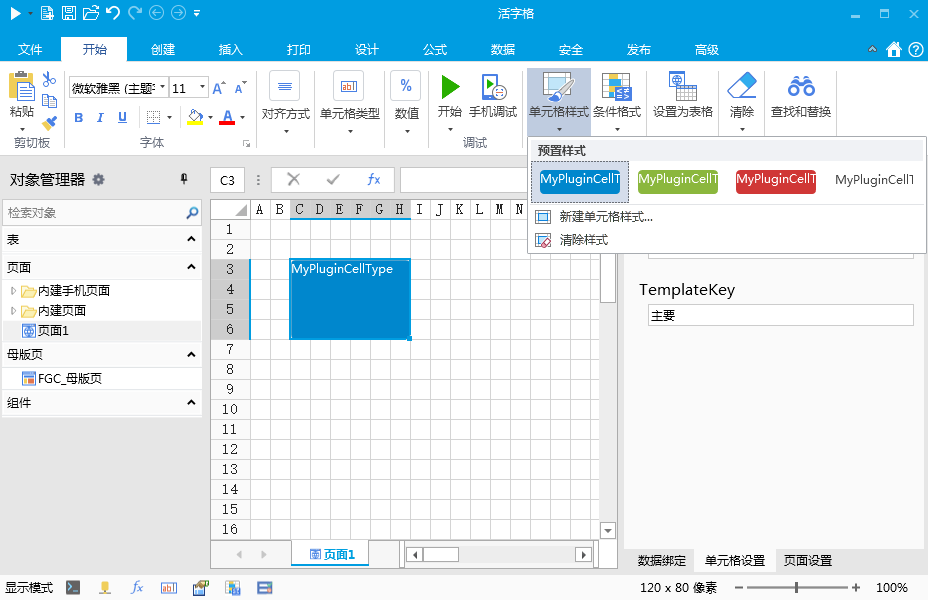
为了方便实现设计时预览,活字格提供了使用预置样式生成WPF容器控件的工具方法,添加快速样式的设计时预览如下
csharp
using MyPlugin.Designer.DrawingControl;
using GrapeCity.Forguncy.CellTypes;
using System.Windows;

namespace MyPlugin.Designer
{
    public class MyPluginCellTypeDesigner : CellTypeDesigner<MyPluginCellType>
    {
        public override FrameworkElement GetDrawingControl(ICellInfo cellInfo, IDrawingHelper drawingHelper)
        {
            var control = new MyPluginCellTypeDrawingControl(this.CellType, cellInfo, drawingHelper);
            if (cellInfo.StyleTemplateInfo != null && cellInfo.StyleTemplateInfo.TryGetValue("主体", out var style))
            {
                var previewControl = drawingHelper.CreateStylePreviewControl(style.NormalStyle);
                previewControl.Child = control;
                return previewControl as FrameworkElement;
            }
            return control; ;
        }
    }
}
设计器中的效果
运行时
活字格会自动为使用到的单元格生成 CSS Class
命名规则如下:
【名字空间】+【单元格类型名称】+【-】+【styleTemplate.Key】+【-】+【样式部分名称】
JavaScript 代码如下
csharp
MyPluginCellTypeStyleClassCache = {};
class MyPluginCellType extends Forguncy.Plugin.CellTypeBase {
    createContent() {
        const button = $("<button style='width:100%;height:100%;'>");
        if (this.CellElement.StyleTemplate) {
            const styleTemplate = this.CellElement.StyleTemplate;
            const styleName = "MyPluginMyPluginCellType" + "-" + styleTemplate.Key + "-" + "主体";
            button.addClass(styleName);
        }
        this.content = button;
        return button;
    }

    setValueToElement(_, value) {
        this.content.text(value?.toString());
    }
}
Forguncy.Plugin.CellTypeHelper.registerCellType("MyPlugin.MyPluginCellType, MyPlugin", MyPluginCellType);
更新: 2022-12-03 19:34:05
原文: https://www.yuque.com/robert-bh51n/ea8l6c/mu0r7i7h7gh84rwe