Appearance
树结构属性
如果一个属性的希望保存树形结构,那么可以通过标注TreePropertyAttribute,使得活字格设计器可以通过弹出二级对话框来编辑该属性。
注意,
- NodeType属性里声明的类型必须与结点对象类型一致
- 属性类型必须是
List<ITreeNode>并且通过new List<ITreeNode>()方法初始化 - 结点类型必须实现
ITreeNode接口 - Children属性必须通过
new List<NodeObj>();初始化 - 自定义结点的类型应该从 ObjectPropertyBase 类派生,以确保在单元格复制的时候,子属性可以被正确的深克隆(ObjectPropertyBase实现了默认的深克隆逻辑)
csharp
using GrapeCity.Forguncy.CellTypes;
using GrapeCity.Forguncy.Plugin;
using System.Collections.Generic;

namespace MyPlugin
{
    public class MyPluginCellType : CellType
    {
        [TreeProperty(NodeType = typeof(NodeObj))]
        public List<ITreeNode> TreeNodes { get; set; } = new List<ITreeNode>();
    }

    public class NodeObj : ObjectPropertyBase, ITreeNode
    {
        public string Text { get; set; }
        public IEnumerable<ITreeNode> Children { get; set; } = new List<NodeObj>();
        public string SubProperty1 { get; set; }
        public string SubProperty2 { get; set; }
    }
}
在设计器中效果如下
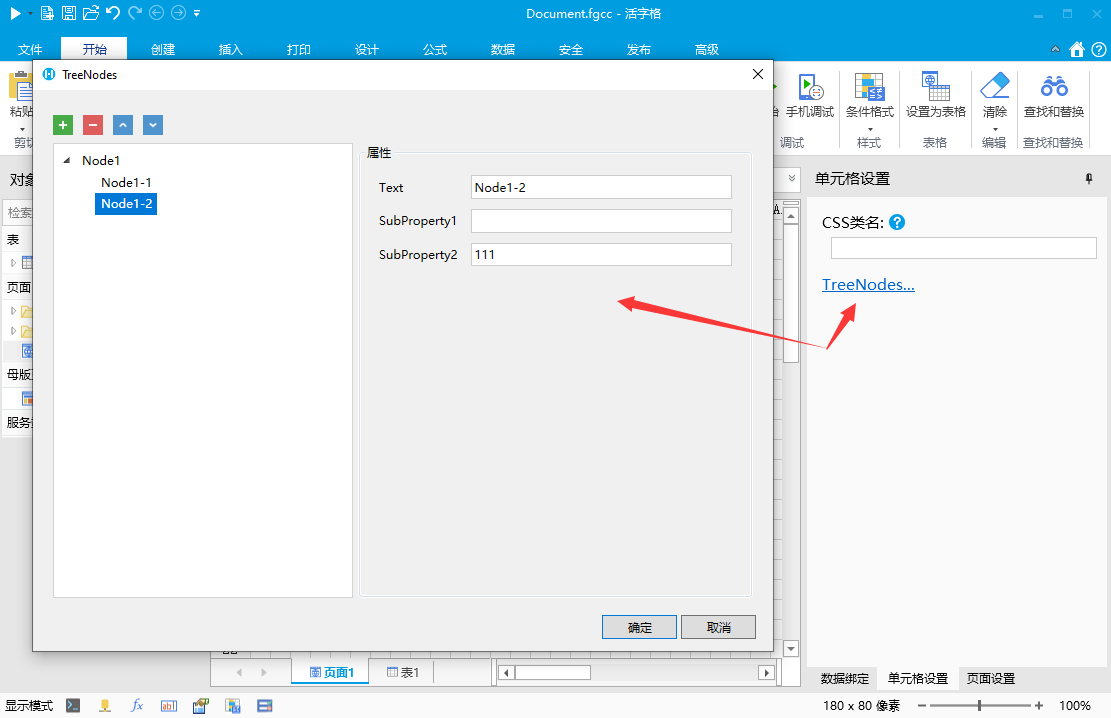
结点项目的子属性也可以通过标注来控制属性编辑控件
下面例子中,额外声明了两个属性分别使用公式编辑器和命令编辑器。具体标注的用法请参考之前的章节
csharp
    public class MyPluginCellType : CellType
    {
        [TreeProperty(NodeType = typeof(NodeObj))]
        public List<ITreeNode> TreeNodes { get; set; } = new List<ITreeNode>();
    }

    public class NodeObj : ObjectPropertyBase, ITreeNode
    {
        public string Text {get;set;}
        public IEnumerable<ITreeNode> Children { get; set; } = new List<NodeObj>();
        [FormulaProperty]
        public string SubProperty1 { get; set; }
        [CustomCommandObject]
        [DisplayName("点击命令")]
        public string SubProperty2 { get; set; }
    }
在设计器中效果如下
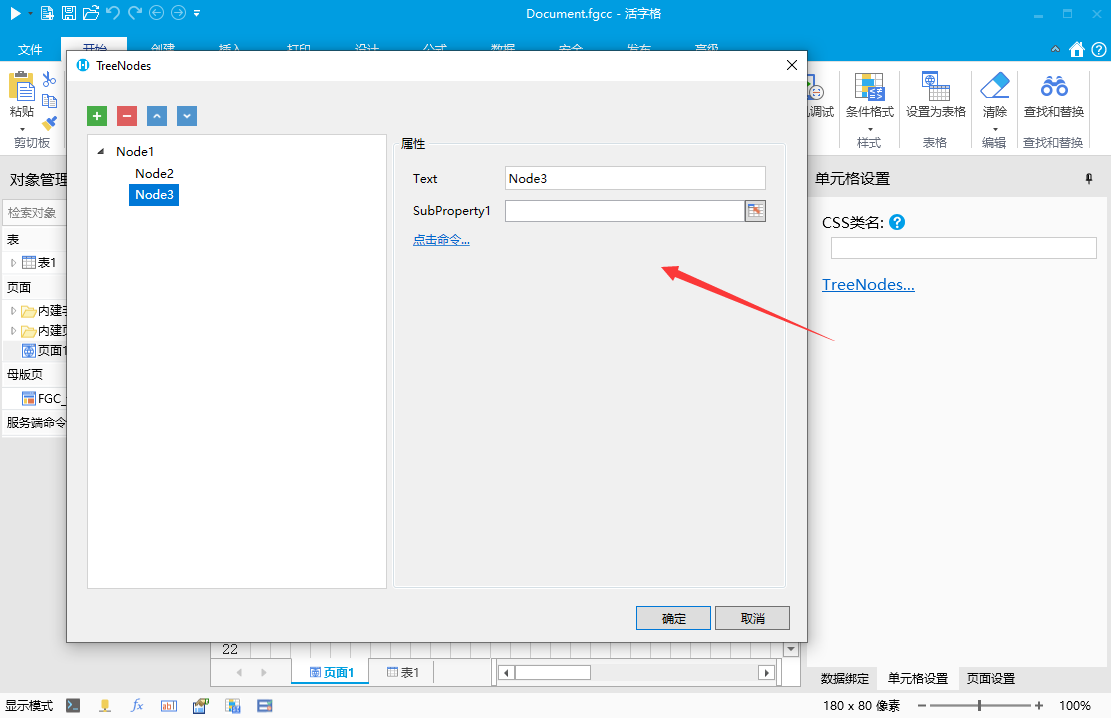
如果需要更细致的控制,可以通过TreePropertyAttribute的其他属性来控制
- 控制新增结点的默认名称
- 设置TreePropertyAttribute 的 DefaultNodeName 属性
- 代码
csharp
    public class MyPluginCellType : CellType
    {
        [TreeProperty(NodeType = typeof(NodeObj), DefaultNodeName = "结点")]
        public List<ITreeNode> TreeNodes { get; set; } = new List<ITreeNode>();
    }

    public class NodeObj : ObjectPropertyBase, ITreeNode
    {
        public string Text {get;set;}
        public IEnumerable<ITreeNode> Children { get; set; } = new List<NodeObj>();
        public string SubProperty1 { get; set; }
        public string SubProperty2 { get; set; }
    }
更新: 2023-02-22 20:32:54
原文: https://www.yuque.com/robert-bh51n/ea8l6c/mb5dwdt8sfoqiag6