Appearance
对象属性
默认情况下,如果一个属性的类型是对象类型,这个类型又包含了一些子属性,那么可以通过标注ObjectPropertyAttribute,使得活字格设计器可以通过弹出二级对话框来编辑该属性。
注意,ObjType属性里声明的类型必须与属性类型一致
自定义对象的类型应该从 ObjectPropertyBase 类派生,以确保在单元格复制的时候,子属性可以被正确的深克隆(ObjectPropertyBase实现了默认的深克隆逻辑)
csharp
using GrapeCity.Forguncy.Commands;
using GrapeCity.Forguncy.Plugin;
using System.Threading.Tasks;

namespace MyPlugin
{
    public class MyPluginServerCommand : Command, ICommandExecutableInServerSideAsync
    {
        [ObjectProperty(ObjType = typeof(MyObj))]
        public MyObj MyProperty { get; set; }

        public async Task<ExecuteResult> ExecuteAsync(IServerCommandExecuteContext dataContext)
        {
            return new ExecuteResult();
        }
        public override CommandScope GetCommandScope()
        {
            return CommandScope.ExecutableInServer;
        }
    }
    public class MyObj : ObjectPropertyBase
    {
        public string Name { get; set; }
        public string Description { get; set; }
    }
}
在设计器中效果如下
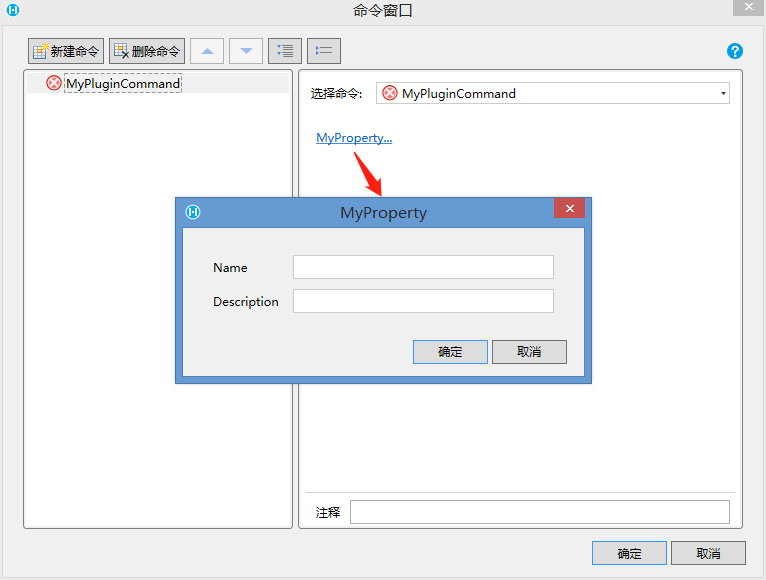
对象的子属性也可以通过标注来控制属性编辑控件
下面例子中,额外声明了一个属性使用公式编辑器。具体标注的用法请参考之前的章节
csharp
    public class MyPluginServerCommand : Command, ICommandExecutableInServerSideAsync
    {
        [ObjectProperty(ObjType = typeof(MyObj))]
        public MyObj MyProperty { get; set; }

        public async Task<ExecuteResult> ExecuteAsync(IServerCommandExecuteContext dataContext)
        {
            return new ExecuteResult();
        }
        public override CommandScope GetCommandScope()
        {
            return CommandScope.ExecutableInServer;
        }
    }
    public class MyObj : ObjectPropertyBase
    {
        public string Name { get; set; }
        public string Description { get; set; }

        [FormulaProperty]
        public object FormulaProperty { get; set; }
    }
在设计器中效果如下
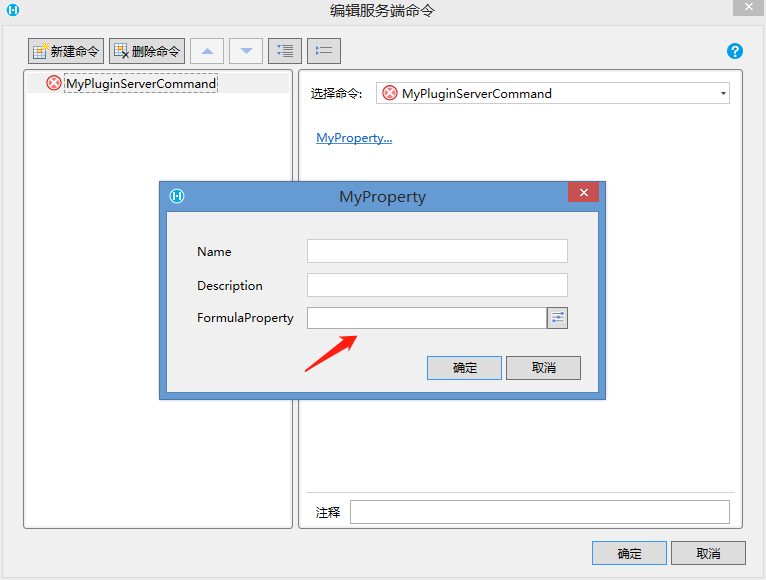
高级配置
- 添加描述
- 设置 DescriptionAttribute
- 代码
csharp
    public class MyPluginServerCommand : Command, ICommandExecutableInServerSideAsync
    {
        [ObjectProperty(ObjType=typeof(MyObj))]
        public MyObj MyProperty { get; set; }

        public async Task<ExecuteResult> ExecuteAsync(IServerCommandExecuteContext dataContext)
        {
            return new ExecuteResult();
        }
        public override CommandScope GetCommandScope()
        {
            return CommandScope.ExecutableInServer;
        }
    }

    [Description("* 添加一段描述文字,帮助使用者更好的理解这个对象的设置,如果描述文字很长,会自动折行,所以不用担心长度限制")]
    public class MyObj: ObjectPropertyBase
    {
        public string Name { get; set; }
        public string Description { get; set; }

        [FormulaProperty]
        public object FormulaProperty { get; set; }

        [CustomCommandObject]
        [DisplayName("点击命令")]
        public object ClickCommand { get; set; }
    }
3. 设计器中的效果
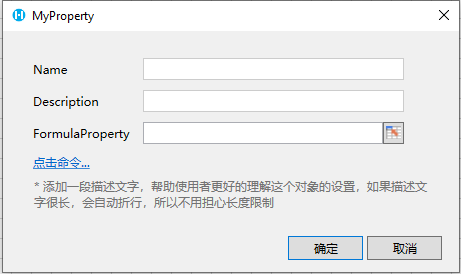 4. 此特性为10.0.0.0版本新增 2. 给对象添加自定义校验 1. 给属性添加DesignerAttribute 重写Validate方法添加自定义校验 2. 代码
csharp
    public class MyPluginServerCommand : Command, ICommandExecutableInServerSideAsync
    {
        [ObjectProperty(ObjType = typeof(MyObj))]
        public MyObj MyProperty { get; set; }

        public async Task<ExecuteResult> ExecuteAsync(IServerCommandExecuteContext dataContext)
        {
            return new ExecuteResult();
        }
        public override CommandScope GetCommandScope()
        {
            return CommandScope.ExecutableInServer;
        }
    }
    [Designer(typeof(MyObjectDesigner))]
    public class MyObj : ObjectPropertyBase
    {
        [Required]
        public string Name { get; set; }
        public string Description { get; set; }

        [FormulaProperty]
        public object FormulaProperty { get; set; }

        [CustomCommandObject]
        [DisplayName("点击命令")]
        public object ClickCommand { get; set; }
    }

    public class MyObjectDesigner : ObjectDesigner
    {
        public override string Validate()
        {
            if (this.Obj is MyObj myObj)
            {
                if (myObj.FormulaProperty == null && myObj.Description == null)
                {
                    return "FormulaProperty 和 Description 属性至少有一个不能为空";
                }
            }
            return base.Validate();
        }
    }
3. 设计器时效果
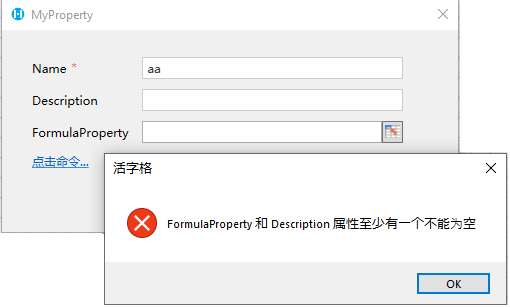 4. 此特性为10.0.0.0版本新增 3. 内嵌显示 1. 给对象标注 FlatObjectProperty 可以实现对象的内嵌显示 2. 代码
csharp
    public class MyPluginServerCommand : Command, ICommandExecutableInServerSideAsync
    {
        [DisplayName("姓名")]
        public string Name { get; set; }

        [FlatObjectProperty]
        [DisplayName("地址")]
        public Address Address { get; set; } = new Address();

        public async Task<ExecuteResult> ExecuteAsync(IServerCommandExecuteContext dataContext)
        {
            return new ExecuteResult();
        }
        public override CommandScope GetCommandScope()
        {
            return CommandScope.ExecutableInServer;
        }
    }

    public class Address : ObjectPropertyBase
    {
        [DisplayName("省份")]
        public string Province { get; set; }
        [DisplayName("城市")]
        public string City { get; set; }
    }
3. 设计器时效果
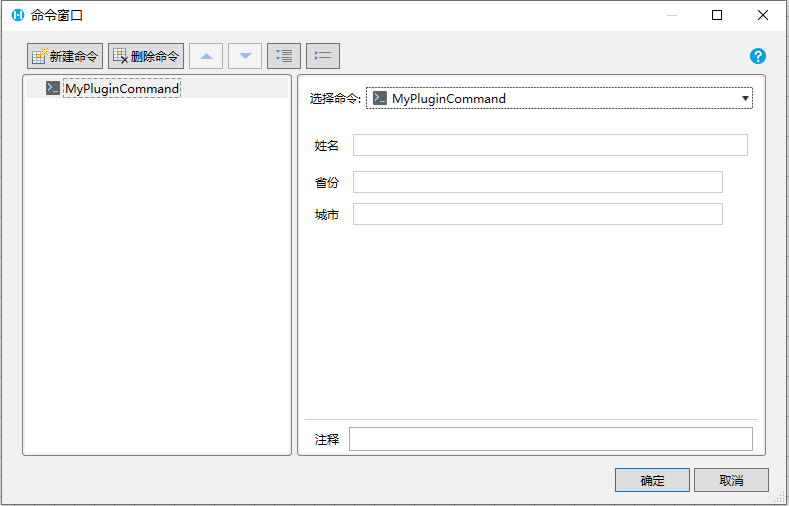 4. 内嵌显示联动 1. 给对象标注 FlatObjectProperty 实现子对象属性内嵌显示,同时通过属性值联动在不同情况下显示不同的子属性 2. 代码
csharp
    [Designer(typeof(MyCommandDesigner))]
    public class MyPluginServerCommand : Command, ICommandExecutableInServerSideAsync
    {
        [ComboProperty(ValueList = "Type1|Type2")]
        public string Type { get; set; } = "Type1";

        [FlatObjectProperty]
        public object SubProperty { get; set; } = new Type1SubProperty();

        public async Task<ExecuteResult> ExecuteAsync(IServerCommandExecuteContext dataContext)
        {
            return new ExecuteResult();
        }
        public override CommandScope GetCommandScope()
        {
            return CommandScope.ExecutableInServer;
        }
    }
    public class Type1SubProperty : ObjectPropertyBase
    {
        public string SubProperty1 { get; set; }
    }
    public class Type2SubProperty : ObjectPropertyBase
    {
        public string SubProperty2 { get; set; }
        [ColorProperty]
        public string SubProperty3 { get; set; }
    }
    public class MyCommandDesigner : CommandDesigner
    {
        public override void OnPropertyEditorChanged(string propertyName, object propertyValue, Dictionary<string, IEditorSettingsDataContext> properties)
        {
            if (propertyName == nameof(MyPluginCommand.Type))
            {
                if (Equals(propertyValue, "Type1"))
                {
                    properties[nameof(MyPluginCommand.SubProperty)].Value = new Type1SubProperty();
                }
                else
                {
                    properties[nameof(MyPluginCommand.SubProperty)].Value = new Type2SubProperty();
                }
            }
            base.OnPropertyEditorChanged(propertyName, propertyValue, properties);
        }
    }
3. 设计器时效果
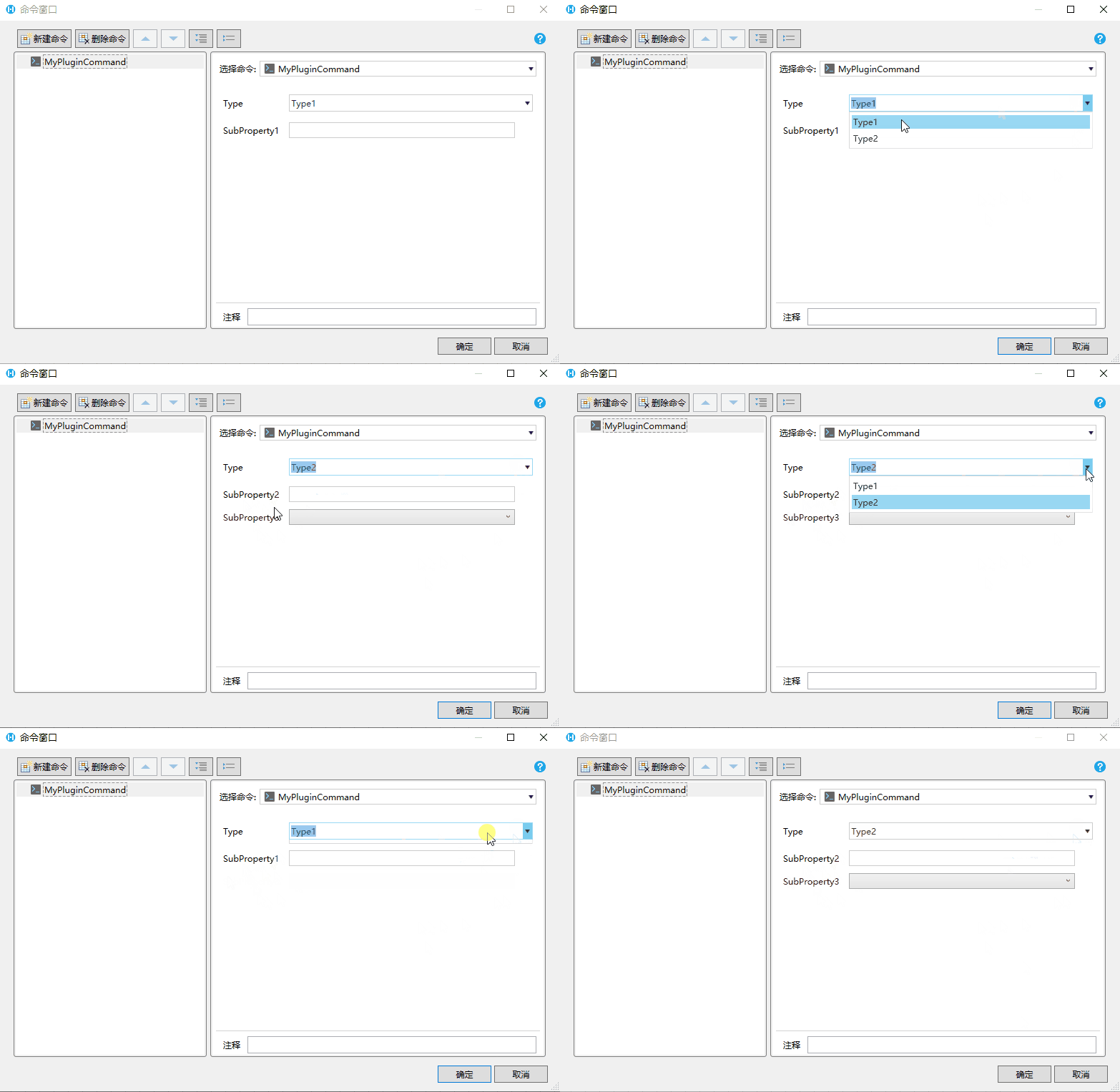 5. 属性变更联动 1. 所有继承自 ObjectPropertyBase 的对象都可以在类型声明时标注 [DesignerAttribute] 特性,可以达到对象内的属性变化联动 2. 此功能同时支持 ObjectProperty、FlatObjectProperty、ObjectListProperty、ListProperty 以及 FlatListProperty 3. 下面的示例代码中, MyObject 对象拥有两个属性,当用户编辑 Data1 时,Data2 将改变,值为 Data1 + 1
csharp
public class TestServerCommand : Command, ICommandExecutableInServerSideAsync
{
    [ObjectProperty(ObjType = typeof(MyObject))]
    public MyObject MyObject1 { get; set; }

    [FlatObjectProperty]
    public MyObject MyObject2 { get; set; } = new MyObject();

    [ObjectListProperty(ItemType = typeof(MyObject))]
    public List<INamedObject> MyObject3 { get; set; } = new List<INamedObject>();

    [ListProperty]
    public List<MyObject> MyObject4 { get; set; } = new List<MyObject>();

    [FlatListProperty]
    public List<MyObject> MyObject5 { get; set; } = new List<MyObject>();

    public async Task<ExecuteResult> ExecuteAsync(IServerCommandExecuteContext dataContext)
    {
        return new ExecuteResult();
    }
    public override CommandScope GetCommandScope()
    {
        return CommandScope.ExecutableInServer;
    }
}

[Designer(typeof(MyObjectDesigner))]
public class MyObject : ObjectPropertyBase, INamedObject
{
    [Browsable(false)]
    public string Name { get; set; }

    public int Data1 { get; set; }

    public int Data2 { get; set; }
}

public class MyObjectDesigner : ObjectDesigner
{
    public override void OnPropertyEditorChanged(string propertyName, object propertyValue, Dictionary<string, IEditorSettingsDataContext> properties)
    {
        if (propertyName == nameof(MyObject.Data1))
        {
            properties[nameof(MyObject.Data2)].Value = (int)propertyValue + 1;
        }
        base.OnPropertyEditorChanged(propertyName, propertyValue, properties);
    }
}
4. 设计器效果
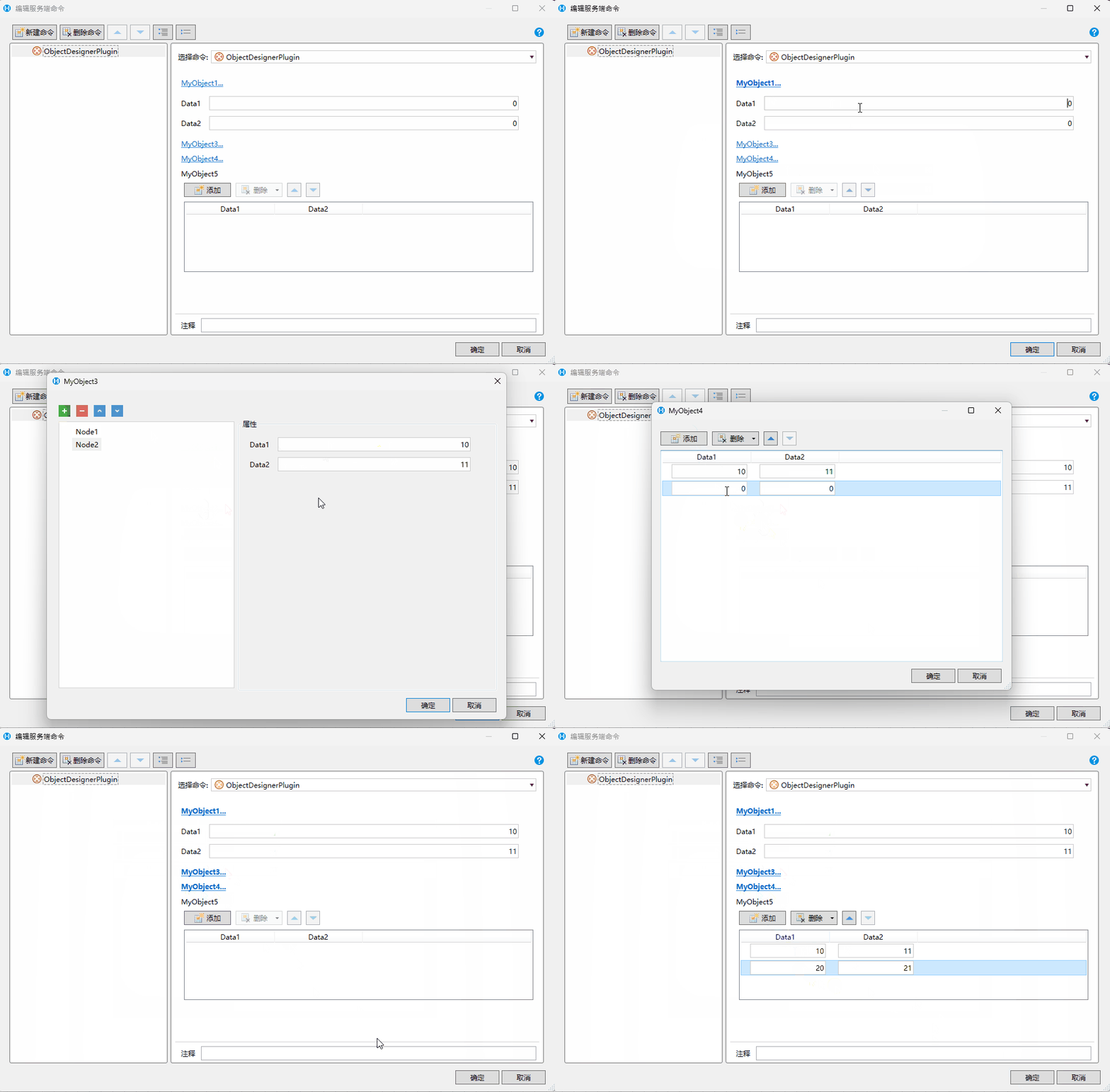
5. 此特性为 **10.0.100.0** 版本新增
更新: 2024-09-12 08:41:59
原文: https://www.yuque.com/robert-bh51n/ea8l6c/yvpo5562duxn07m3