Appearance
支持复杂类型的单元格格式
对于文本输入框、按钮等普通的单元格类型,您可以直接使用 支持单元格样式 功能实现单元格样式功能。
但是有些复杂类型的单元格,比如表格、树等同一个单元格类型内,需要对不同的模块分别设置单元格样式,那么就需要使用到本章方式了。
本例以一个表格单元格的Demo代码为例,说明如何在表格上,分别为列头和列以及其他列设置单元格格式。
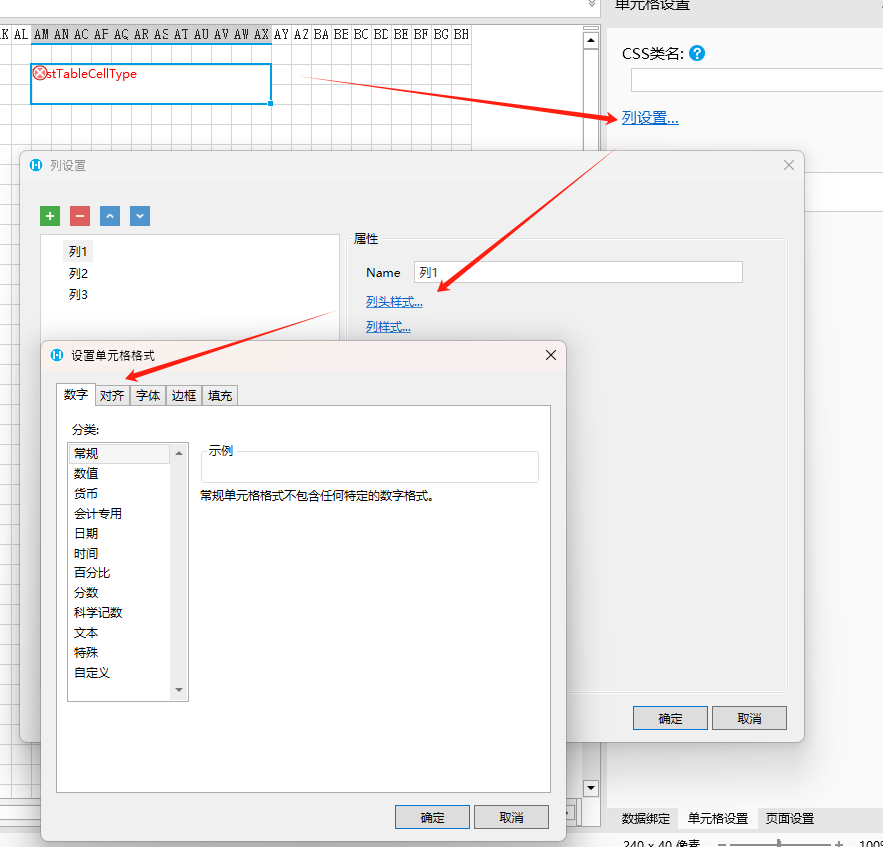
如上图所示,单元格类型可以为多个列以及同一个列的列头和列内容分别设置单元格格式,上述示例的代码如下所示:
csharp
[Icon("pack://application:,,,/Test;component/Resources/Icon.png")]
[Designer("Test.Designer.TestTableCellTypeDesigner, Test")]
public class TestTableCellType : CellType
{
    [DisplayName("列设置")]
    [ObjectListProperty(ItemType = typeof(TestTableColumnConfig), DefaultName = "列")]
    public List<INamedObject> Columns { get; set; } = new List<INamedObject>();
}

public class TestTableColumnConfig : ObjectPropertyBase, INamedObject
{
    public string Name { get; set; }

    [DisplayName("列头样式")]
    [CellFormatSetting]
    public ForguncyStyleInfo HeaderStyleFormat { get; set; }

    [DisplayName("列样式")]
    [CellFormatSetting]
    public ForguncyStyleInfo StyleFormat { get; set; }
}
您可以使用 ObjectListProperty类型的属性作为表格的列定义,然后在属性内,使用 ForguncyStyleInfo类型的子属性定义每一个列的单元格格式信息,从而实现为一个复杂类型的单元格类型中的不同模块分别设置单元格格式功能。
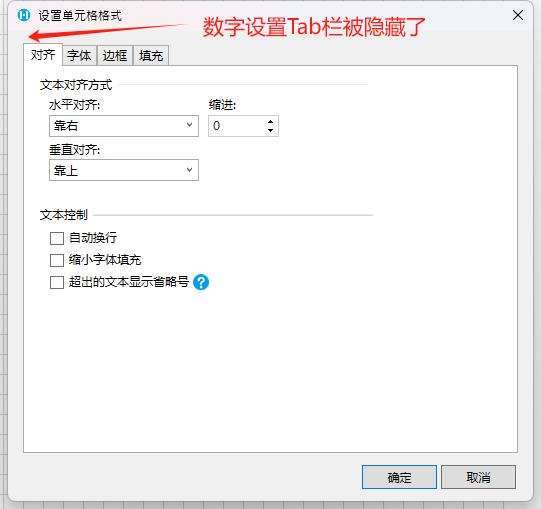
- FormatTabType:表示单元格格式设置所支持的Tab栏类型,默认为 PluginFormatDialogTabType.Normal 表示全部开启。您可以如下配置所示隐藏
数字Tab栏:
csharp
[Icon("pack://application:,,,/Test;component/Resources/Icon.png")]
[Designer("Test.Designer.TestTableCellTypeDesigner, Test")]
public class TestTableCellType : CellType
{
    [DisplayName("列设置")]
    [ObjectListProperty(ItemType = typeof(TestTableColumnConfig), DefaultName = "列")]
    public List<INamedObject> Columns { get; set; } = new List<INamedObject>();
}

public class TestTableColumnConfig : ObjectPropertyBase, INamedObject
{
    public string Name { get; set; }

    [DisplayName("列头样式")]
    [CellFormatSetting(
        FormatTabType = PluginFormatDialogTabType.Normal ^ PluginFormatDialogTabType.Number)]
    public ForguncyStyleInfo HeaderStyleFormat { get; set; }
}
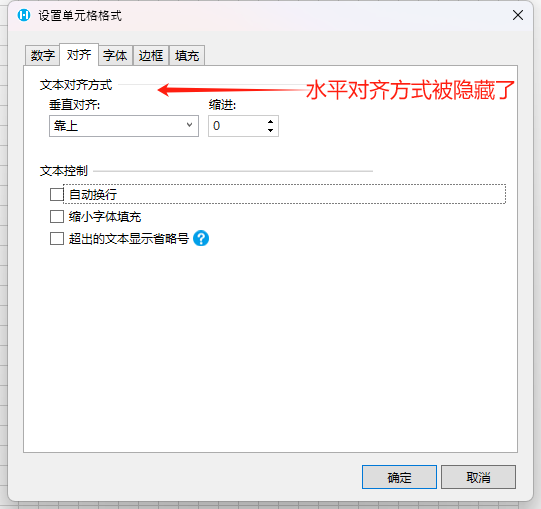
- AlignmentFormatOptions:表示对齐设置Tab栏中支持的配置项,默认值为 PluginAlignmentFormatOptions.All 表示全部开启。您可以如下配置所示隐藏
水平对齐设置项:
csharp
[Icon("pack://application:,,,/Test;component/Resources/Icon.png")]
[Designer("Test.Designer.TestTableCellTypeDesigner, Test")]
public class TestTableCellType : CellType
{
    [DisplayName("列设置")]
    [ObjectListProperty(ItemType = typeof(TestTableColumnConfig), DefaultName = "列")]
    public List<INamedObject> Columns { get; set; } = new List<INamedObject>();
}

public class TestTableColumnConfig : ObjectPropertyBase, INamedObject
{
    public string Name { get; set; }

    [DisplayName("列头样式")]
    [CellFormatSetting(
        AlignmentFormatOptions = PluginAlignmentFormatOptions.All ^ PluginAlignmentFormatOptions.HorizontalAlignment)]
    public ForguncyStyleInfo HeaderStyleFormat { get; set; }
}
单元格格式的返回值最终会保存在 ForguncyStyleInfo类型的属性中,此类型的各个字段的意思分别是:
| 属性名 | 说明 | 类型 |
|---|---|---|
| BackgroundStr | 背景颜色 | string 类型 |
| BorderLeft | 左边框 | ForguncyBorderLine类型,包含两个属性: 1. ColorStr,字符串类型,表示边框颜色 2. ForguncyBorderLineStyle,枚举类型,表示边框线性 |
| BorderTop | 上边框 | |
| BorderRight | 右边框 | |
| BorderBottom | 下边框 | |
| FontFamily | 字体 | string 类型 |
| FontSize | 字号 | string 类型 |
| FontStyle | 字体倾斜 | string 类型 |
| FontWeight | 字体加粗 | string 类型 |
| ForegroundStr | 字体颜色 | string 类型 |
| FormatString | 数字格式字符串 | string 类型 |
| Strikethrough | 是否右删除线 | bool 类型 |
| TextIndent | 缩进 | int 类型 |
| Underline | 是否有下划线 | bool 类型 |
| WordWrap | 是否可以自动换行 | bool 类型 |
| ShrinkToFit | 是否自动字体缩小填充 | bool 类型 |
| Ellipsis | 超出文本是否展示省略号 | bool 类型 |
| HorizontalAlignment | 水平对齐方式 | ForguncyCellHorizontalAlignment枚举类型 |
| VerticalAlignment | 垂直对齐方式 | |
| DisplayTab | 打开后默认的展示Tab栏 | PluginFormatDialogTabType枚举类型 |
通过上述配置,您在运行时就可得到如下所示的配置对象
INFO
{
"backgroundStr": "Accent 6 40",

"fontFamily": "Body",

"fontSize": 18.666666666666664,

"fontWeight": "bold",

"strikethrough": false,

"textIndent": 0,

"underline": false,

"wordWrap": false,

"shrinkToFit": false,

"ellipsis": false,

"horizontalAlignment": 1,

"verticalAlignment": 1
}
在运行时,您需要将上述设置时的参数自行解析为前端的样式,根据前端的框架不同,设置的方式可能各有不同。
需要注意的点:
- 格式设置的属性必须为
ForguncyStyleInfo类型 - 运行时的参数是以小驼峰的形式传递的
- 此特性为 10.0.100.0 版本新增
更新: 2024-09-09 16:56:06
原文: https://www.yuque.com/robert-bh51n/ea8l6c/zxfaywmlqeod9itg