Appearance
添加高级单元格操作
在上一章节中,我们了解了如何通过标注 SupportModifyByRuntimePropertyAttribute 生成一个设置单元格指定属性的单元格操作。
本章节将介绍,如何添加多个参数,多个返回值的复杂的单元格操作。
基础支持
在MyPluginCellType.cs文件中做如下修改, 声明一个public 的函数,标注RunTimeMethodAttribute,函数的名称会作为单元格操作的名称。
csharp
    public class MyPluginCellType : CellType
    {
        [RunTimeMethod]
        public void MyOperation()
        {
        }
    }
设计器效果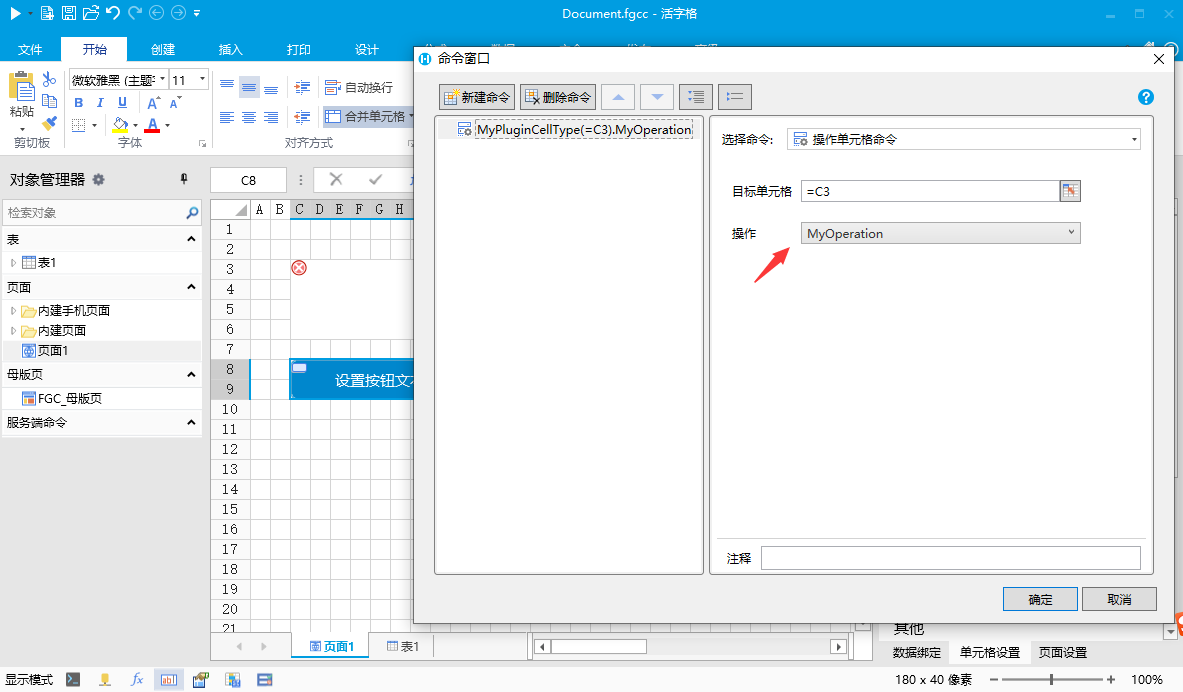
修改 文件中的JavaScript代码,注意,这里添加了 “MyOperation”方法,这个方法名需要与C#中声明的方法名相同。当操作单元格命令执行时,会执行MyOperation方法中的代码
javascript
class MyPluginCellType extends Forguncy.Plugin.CellTypeBase {
    content = null;
    createContent() {
        this.content = $("<button style='width:100%;height:100%;'></button>");
        return this.content;
    }
    MyOperation() {
        alert("MyOperation 函数被调用");
    }
}
Forguncy.Plugin.CellTypeHelper.registerCellType("MyPlugin.MyPluginCellType, MyPlugin", MyPluginCellType);
支持参数
在MyPluginCellType.cs文件中做如下修改, 声明一个public 的函数,标注RunTimeMethodAttribute,函数的名称会作为单元格操作的名称,函数的参数会作为单元格操作命令的参数。参数类型可以通过单元格属性相同的标注方法标注。注意,如果要修改参数的显示名,需要使用 ItemDisplayNameAttribute 而不是 DisplayNameAttribute
csharp
    public class MyPluginCellType : CellType
    {
        [RunTimeMethod]
        public void MyOperation(
            [ItemDisplayName("参数1")]
            string param1,
            [ItemDisplayName("参数2")]
            [ComboProperty(ValueList = "选项1|选项2")]
            string param2)
        {
        }
    }
设计器效果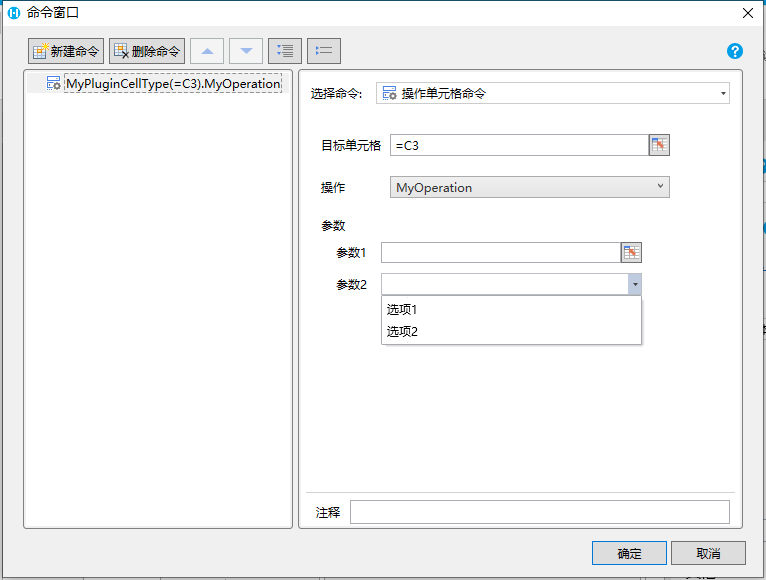
修改 文件中的JavaScript代码,注意,这里添加了 “MyOperation”方法,这个方法名需要与C#中声明的方法名相同。并且声明了方法的参数,也与C#方法的参数相同。当操作单元格命令执行时,会执行MyOperation方法中的代码,并且传入参数值
javascript
class MyPluginCellType extends Forguncy.Plugin.CellTypeBase {
    content = null;
    createContent() {
        this.content = $("<button style='width:100%;height:100%;'></button>");
        return this.content;
    }
    MyOperation(param1, param2) {
        alert(`MyOperation 函数被调用, 参数1:${param1}, 参数2:${param2}`);
    }
}
Forguncy.Plugin.CellTypeHelper.registerCellType("MyPlugin.MyPluginCellType, MyPlugin", MyPluginCellType);
支持返回值
在MyPluginCellType.cs文件中做如下修改,函数的返回值会作为命令的返回值。
csharp
    public class MyPluginCellType : CellType
    {
        public string MyProperty { get; set; } = "MyPlugin";

        [RunTimeMethod]
        public GetDisplayTextResult GetDisplayText()
        {
            return null;
        }
    }
    public class GetDisplayTextResult
    {
        public string DisplayText { get; set; }
    }
设计器效果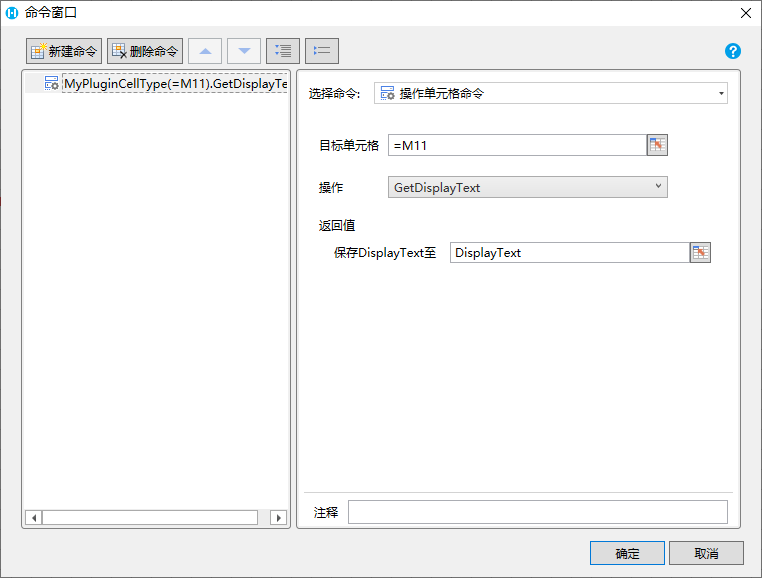
后续命令可以通过公式使用返回值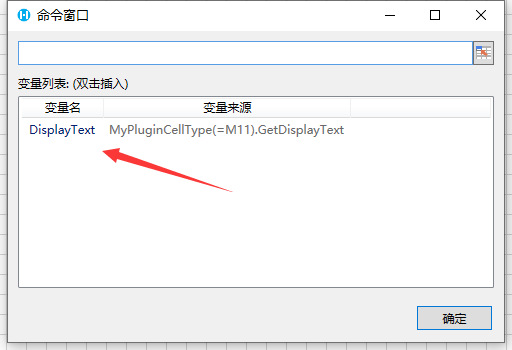
修改 文件中的JavaScript代码,注意,这里添加了 “GetDisplayText”方法,这个方法名需要与C#中声明的方法名相同。返回值,也与C#方法的返回值中的属性同名。当操作单元格命令执行时,会执行MyOperation方法中的代码,结果会被存入变量中供后续命令使用
javascript
class MyPluginCellType extends Forguncy.Plugin.CellTypeBase {
    createContent() {
        this.content = $("<button style='width:100%;height:100%;'></button>");
        return this.content;
    }
    GetDisplayText() {
        return {
            DisplayText: "我的返回值"
        }
    }
}
Forguncy.Plugin.CellTypeHelper.registerCellType("MyPlugin.MyPluginCellType, MyPlugin", MyPluginCellType);
WARNING
注意
- C#函数的返回值必须是对象,对象中的属性表示返回值属性
- 返回值属性可以有多个
- 返回值属性可以标注 DisplayNameAttribute 来显示中文
- JavaScript函数执行需要返回一个对象,对象的属性要与C#反正值类上的属性同名
- 可以同时支持参数和返回值
更新: 2022-12-30 14:40:04
原文: https://www.yuque.com/robert-bh51n/ea8l6c/byfq9tmskzhef0tx