Appearance
命令属性
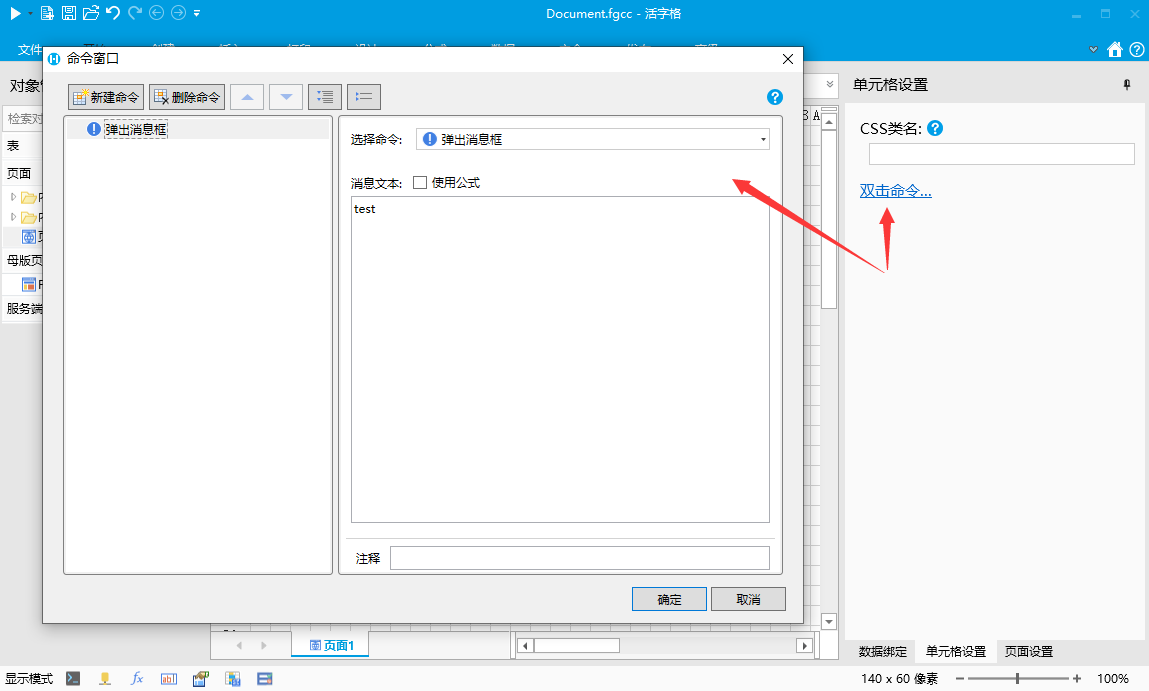
如果属性表示运行时执行的命令,希望通过命令对话框编辑,可以通过标注CustomCommandObjectAttribute 的方式设置。
注意,标注CustomCommandObjectAttribute的属性类型必须是 object
csharp
    public class MyPluginCellType : CellType
    {
        [CustomCommandObject]
        [DisplayName("双击命令")]
        public object DoubleClickCommand { get; set; }
    }
在设计器中效果如下
对应的JavaScript处理代码
javascript
class MyPluginCellType extends Forguncy.Plugin.CellTypeBase {
    createContent() {
        const content = $("<div style='width:100%;height:100%;background:red'>双击测试</div>");

        const command = this.CellElement.CellType.DoubleClickCommand;

        content.dblclick(() => {
            this.executeCustomCommandObject(command);
        });

        return content;
    }
}
Forguncy.Plugin.CellTypeHelper.registerCellType("MyPlugin.MyPluginCellType, MyPlugin", MyPluginCellType);
如果需要更细致的控制,可以通过CustomCommandObjectAttribute的其他属性来控制
- 支持上下文参数
- 设置CustomCommandObjectAttribute 的 InitParamValues 和 InitParamProperties 属性
- 代码
csharp
    public class MyPluginCellType : CellType
    {
        [CustomCommandObject(InitParamProperties = "x|y", InitParamValues = "X坐标|Y坐标")]
        [DisplayName("双击命令")]
        public object DoubleClickCommand { get; set; }
    }
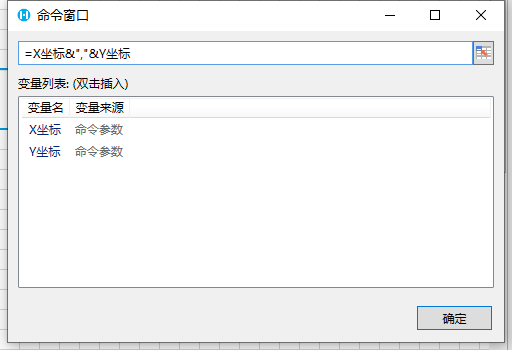
3. 设计器效果
 4. JavaScript 添加上下文参数处理
javascript
class MyPluginCellType extends Forguncy.Plugin.CellTypeBase {
    createContent() {
        const content = $("<div style='width:100%;height:100%;background:red'>双击测试</div>");

        const command = this.CellElement.CellType.DoubleClickCommand;

        content.dblclick(e => {
            const initPrarm = {};
            initPrarm[command.ParamProperties["x"]] = e.offsetX;
            initPrarm[command.ParamProperties["y"]] = e.offsetY;
            this.executeCustomCommandObject(command, initPrarm);
        });

        return content;
    }
}
Forguncy.Plugin.CellTypeHelper.registerCellType("MyPlugin.MyPluginCellType, MyPlugin", MyPluginCellType);- 上下文参数支持添加描述,
- 设置CustomCommandObjectAttribute 的 ParameterDescriptions 属性
- 代码
csharp
    public class MyPluginCellType : CellType
    {
        [CustomCommandObject(InitParamProperties = "x|y", InitParamValues = "X坐标|Y坐标",
            ParameterDescriptions = "x:从坐标圆点水平向右的距离,单位为像素|y:从坐标原点垂直向下的距离,单位为像素")]
        [DisplayName("双击命令")]
        public object DoubleClickCommand { get; set; }
    }
3. 设计器效果
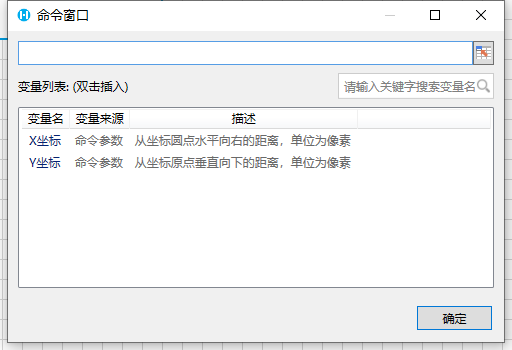 4. 说明 1. 添加适当的描述可以帮助用户更好的理解上下文变量的意义 2. 可以只给部分上下文变量添加注释 3. 本特性要求活字格版本大于等于9.0.100.0
说明:
在过去版本的单元格插件教程中,如果单元格需要添加命令处理,需要实现ICommandCellType接口,新版本支持了CustomCommandObjectAttribute,相对于之前有以下提升
- 不限制命令属性的个数,可以为一个单元格添加多个自定义命令属性,如单击命令,双击命令,键盘处理命令等
- 支持命令上下文,不同命令可以定义命令不同的初始上下文参数,方便用户定义不同上下文下的处理逻辑
之前的写法,出于兼容性的考虑依然保留,新的单元格建议使用新的方式定义命令属性
WARNING
命令执行防抖:
为了避免相同的命令在短时间内多次执行,同一个单元格的命令在短时间内(1秒内),只会被执行一次。如果希望命令在短时间内执行多次,可以把executeCustomCommandObject的第三个参数设置为随机值
this.executeCustomCommandObject(command, null/initPrarm/, new Date().valueOf().toString());
更新: 2023-09-16 15:22:14
原文: https://www.yuque.com/robert-bh51n/ea8l6c/lq26nef34eb3mru1