Appearance
数据源属性
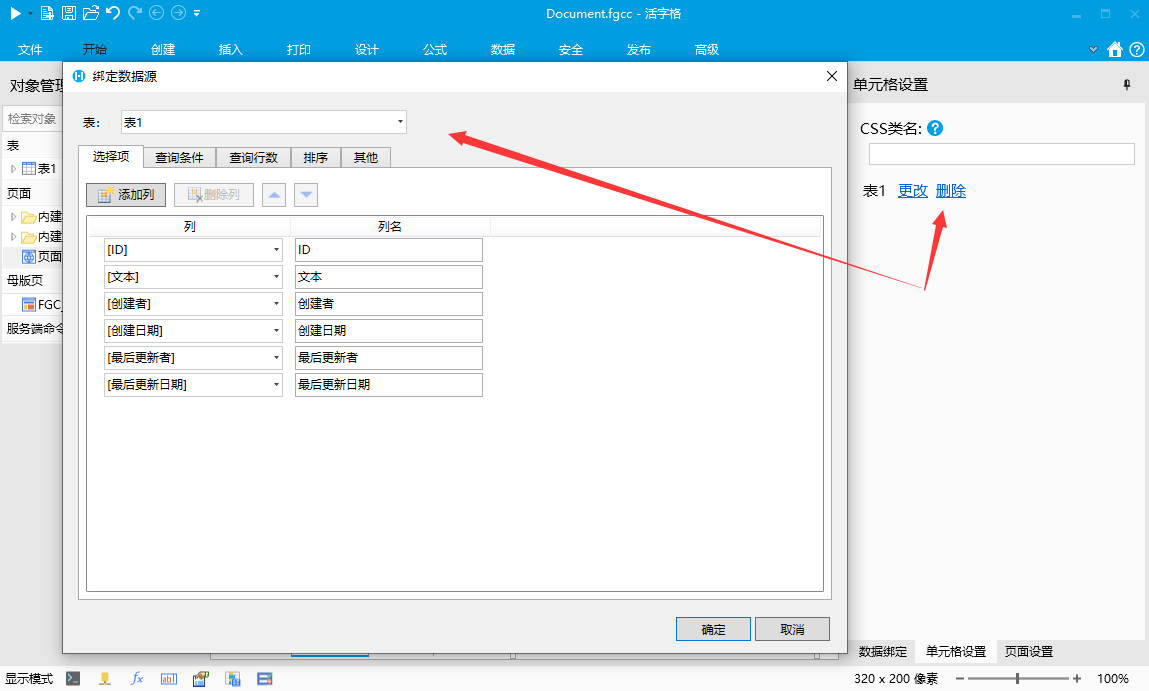
如果属性绑定数据表的值,希望通过数据对话框编辑,可以通过标注BindingDataSourcePropertyAttribute 的方式设置。
注意,标注BindingDataSourcePropertyAttribute的属性类型必须是 object
csharp
    public class MyPluginCellType : CellType
    {
        [BindingDataSourceProperty]
        [DisplayName("绑定数据源")]
        public object DataSource { get; set; }
    }
在设计器中效果如下
对应的JavaScript处理代码
通过单元格上的getBindingDataSourceValue方法获取绑定数据
javascript
class MyPluginCellType extends Forguncy.Plugin.CellTypeBase {
    createContent() {
        const content = $("<div style='width:100%;height:100%;'></div>");

        const datasource = this.CellElement.CellType.DataSource;

        this.getBindingDataSourceValue(datasource, null, data => {
            for (const row of data) {
                const rowDom = $("<div/>");
                for (const colName in row) {
                    rowDom.append($("<span>" + row[colName] + ", </span>"));
                }
                content.append(rowDom);
            }
        });

        return content;
    }
}
Forguncy.Plugin.CellTypeHelper.registerCellType("MyPlugin.MyPluginCellType, MyPlugin", MyPluginCellType);
由于数据源查询条件可能会依赖单元格上的数据,如果单元格上的数据发生变化,需要重新获取数据源。为了处理这种情况,需要监听 onDependenceCellValueChanged 回调函数。所以改进后的JavaScript代码如下:
javascript
class MyPluginCellType extends Forguncy.Plugin.CellTypeBase {
    createContent() {
        const content = $("<div style='width:100%;height:100%;'></div>");

        const datasource = this.CellElement.CellType.DataSource;
        const loadBindingData = () => {
            this.getBindingDataSourceValue(datasource, null, data => {
                content.empty();
                for (const row of data) {
                    const rowDom = $("<div/>");
                    for (const colName in row) {
                        rowDom.append($("<span>" + row[colName] + ", </span>"));
                    }
                    content.append(rowDom);
                }
            });
        }

        this.onDependenceCellValueChanged(() => {
            loadBindingData();
        })
        loadBindingData();

        return content;
    }
}
Forguncy.Plugin.CellTypeHelper.registerCellType("MyPlugin.MyPluginCellType, MyPlugin", MyPluginCellType);
由于数据库数据可能被服务端命令或更新表命令修改,此时如果单元格希望在不重新加载页面的情况下获取最新更新的数据。需要重新 reload() 方法活字格会在服务端命令或更新表命令执行或,检测声明了 BindingDataSourceProperty 的单元格,依次调用 reload() 方法。单元格可以在 reload方法中重新从服务端获取数据。
javascript
class MyPluginCellType extends Forguncy.Plugin.CellTypeBase {
    loadBindingData = () => {
        const datasource = this.CellElement.CellType.DataSource;
        this.getBindingDataSourceValue(datasource, null, data => {
            this.content.empty();
            for (const row of data) {
                const rowDom = $("<div/>");
                for (const colName in row) {
                    rowDom.append($("<span>" + row[colName] + ", </span>"));
                }
                this.content.append(rowDom);
            }
        });
    }
    content = null;
    createContent() {
        this.content = $("<div style='width:100%;height:100%;'></div>");

        this.onDependenceCellValueChanged(() => {
            this.loadBindingData();
        })
        this.loadBindingData();

        return this.content;
    }
    reload() {
        this.loadBindingData();
    }
}

Forguncy.Plugin.CellTypeHelper.registerCellType("MyPlugin.MyPluginCellType, MyPlugin", MyPluginCellType);
使用onDependenceCellValueChanged有一个弊端,如果单元格上有多个公式属性,任何一个公式属性发生变化,都会触发onDependenceCellValueChanged方法的执行,并且再onDependenceCellValueChanged方法中无法区分具体是哪个属性发生了变化。在 V10.0.0.0 中新增了一个方法 getBindingDataSourceValue 方法新加了一个参数,表示如果数据源变化时是否重新执行数据加载回调。代码如下:
javascript
class MyPluginCellType extends Forguncy.Plugin.CellTypeBase {
    content = null;
    createContent() {
        this.content = $("<div style='width:100%;height:100%;'></div>");
        return this.content;
    }
    onPageLoaded() {
        this.getBindingDataSourceValue(this.CellElement.CellType.DataSource, null, data => {
            this.content.empty();
            for (const row of data) {
                const rowDom = $("<div/>");
                for (const colName in row) {
                    rowDom.append($("<span>" + row[colName] + ", </span>"));
                }
                this.content.append(rowDom);
            }
        }, true); // 最后一个参数 true,表示数据源依赖的公式变化时,重新调用回调函数。
    }
}

Forguncy.Plugin.CellTypeHelper.registerCellType("MyPlugin.MyPluginCellType, MyPlugin", MyPluginCellType);
在大部分情况下,getBindingDataSourceValue 加上reloadWhenDependenceChanged参数都可以解决单元格获取数据源的问题。但是有些特殊情况下,希望第一加载数据源和以后加载数据源的逻辑不一样时,可以使用onBindingDataSourceDependenceCellValueChanged 方法监听数据源变更。代码如下
javascript
class MyPluginCellType extends Forguncy.Plugin.CellTypeBase {
    createContent() {
        this.content = $("<div style='width:100%;height:100%'></div>");
        return this.content;
    }
    onPageLoaded() {
        this.loadData(); //第一次
        this.onBindingDataSourceDependenceCellValueChanged(this.CellElement.CellType.DataSource, () => {
            this.loadData(); // 变更回调
        })
    }

    loadData() {
        this.getBindingDataSourceValue(this.CellElement.CellType.DataSource, null, data => {
            this.content.text(JSON.stringify(data));
        });
    }

}
Forguncy.Plugin.CellTypeHelper.registerCellType("MyPlugin.MyPluginCellType, MyPlugin", MyPluginCellType);
WARNING
在V10以后,不再推荐使用 onDependenceCellValueChanged方法,而应该使用 getBindingDataSourceValue 方法或onBindingDataSourceDependenceCellValueChanged方法 。以确保代码更简洁,性能更好,并且支持和组件属性绑定
如果需要更细致的控制,可以通过BindingDataSourcePropertyAttribute的其他属性来控制
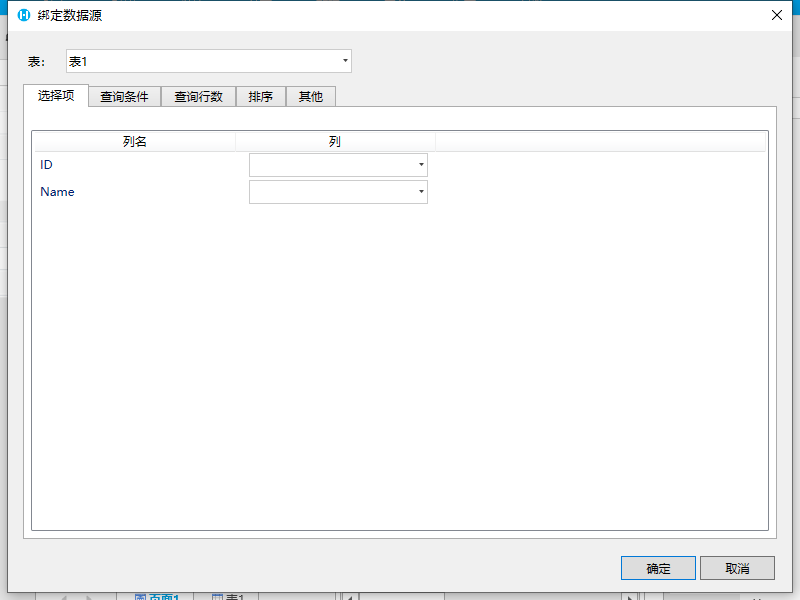
- 预置数据列
- 设置BindingDataSourcePropertyAttribute 的 Columns 属性
- 代码
格式:列名|列名2...
csharp
    public class MyPluginCellType : CellType
    {
        [BindingDataSourceProperty(Columns = "ID|Name")]
        [DisplayName("绑定数据源")]
        public object DataSource { get; set; }
    }
3. 设计器效果
 2. 为预置数据列添加显示文本 1. 设置BindingDataSourcePropertyAttribute 的 Columns 属性 2. 代码
格式:列名:显示名|列名2:显示名|...
csharp
    public class MyPluginCellType : CellType
    {
        [BindingDataSourceProperty(Columns = "ID|Name:姓名|Age:年龄")]
        [DisplayName("绑定数据源")]
        public object DataSource { get; set; }
    }
3. 设计器效果
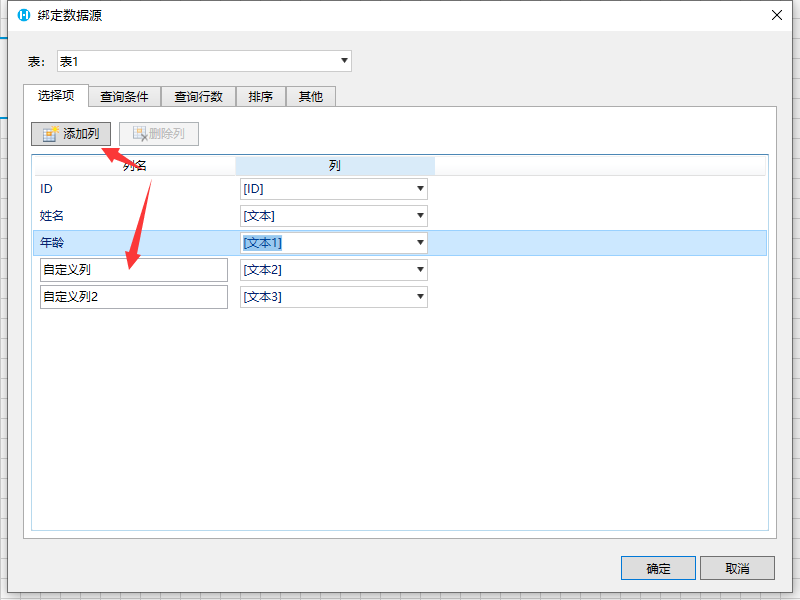
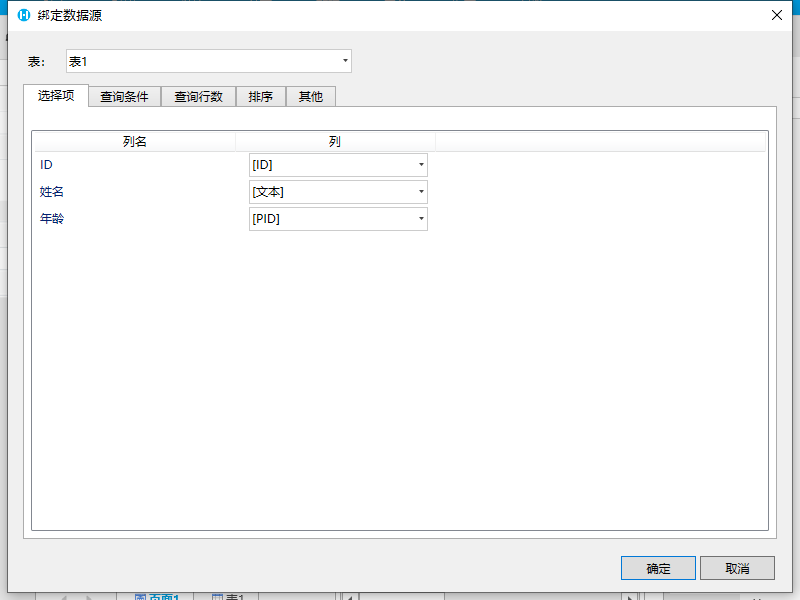 4. 注意,设置显示文本不影响JavaScript端数据处理,只影响在设计器中的显示 5. 如果在此模式下仍然需要添加自定义列,可以设置AllowAddCustomColumns属性
csharp
    public class MyPluginCellType : CellType
    {
        [BindingDataSourceProperty(AllowAddCustomColumns = true, Columns = "ID|Name:姓名|Age:年龄")]
        [DisplayName("绑定数据源")]
        public object DataSource { get; set; }
    }
6. 设置AllowAddCustomColumns之后效果如下(此特性需要活字格版本大于等于9.0.100.0)
 3. 为预置数据源列添加描述信息 1. 设置BindingDataSourcePropertyAttribute 的 ColumnsDescription 属性 2. 代码
格式:列名:描述|列名2:描述2...
csharp
    public class MyPluginCellType : CellType
    {
        [BindingDataSourceProperty(Columns = "ID|Name|Age", ColumnsDescription = "ID:通常绑定主键列|Age:表示年龄列")]
        [DisplayName("绑定数据源")]
        public object DataSource { get; set; }
    }
3. 设计器效果
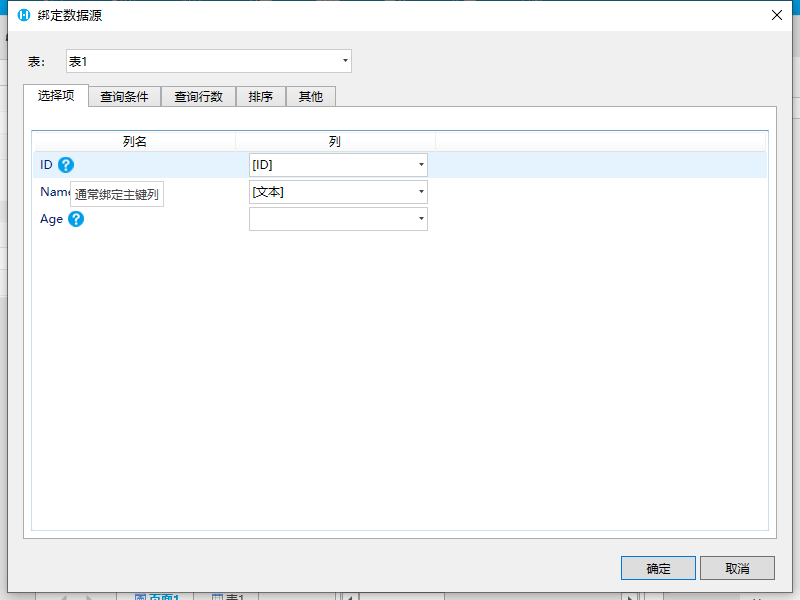 4. 注意,需要和Columns属性配合使用,在Columns里没有的列,设置的描述会被忽略 4. 开启树结构查询配置(ID/PID 结构) 1. 什么是ID/PID结构 1. 在数据库中,是用二维表保存数据的,但是现实生活中,很多数据会有父子关系,例如公司的组织机构,会在数据库中保存为如下形式,这样就可以使用二维表表示树结构了。
| ID | 名称 | PID |
|---|---|---|
| 1 | xx公司 | |
| 2 | 财务部 | 1 |
| 3 | 销售部 | 1 |
| 4 | 销售一组 | 3 |
| 5 | 销售二组 | 3 |
2. 设置BindingDataSourcePropertyAttribute 的 IsIdPidStructure 属性为True声明接受树结构表
3. 代码
csharp
    public class MyPluginCellType : CellType
    {
        [BindingDataSourceProperty(Columns = "ID|Name|PID", IsIdPidStructure = true, TreeIdColumnName = "ID", TreePidColumnName = "PID")]
        [DisplayName("绑定数据源")]
        public object DataSource { get; set; }
    }
4. 设计器效果
会在其他标签页中增加“树形结构查询配置的选项”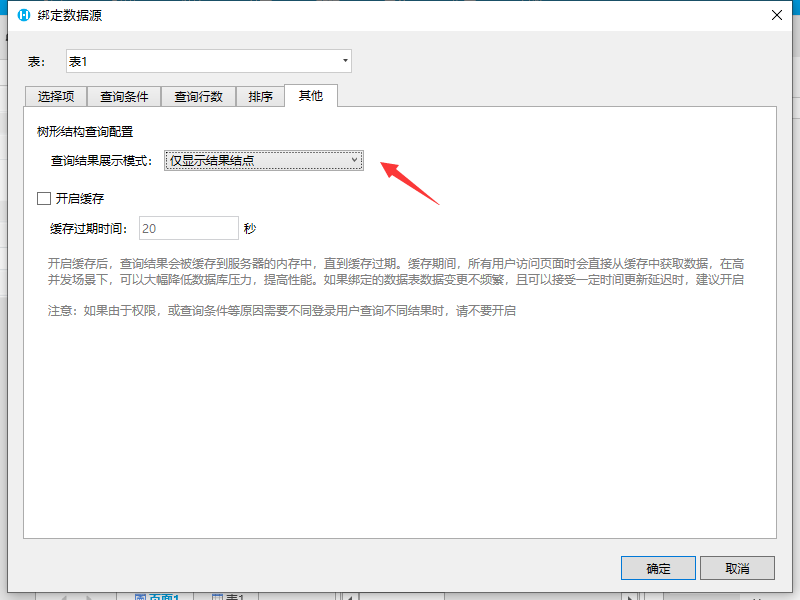 5. 注意,开启树形结构查询配置IsIdPidStructure属性后,需要配合设置 TreeIdColumnName 和 TreePidColumnName 属性
更新: 2024-02-05 16:35:37
原文: https://www.yuque.com/robert-bh51n/ea8l6c/wmx4wh9c5q5s5x67