Appearance
支持返回结果
命令执行后,可以把命令的执行结果保持到变量里,以便后续的命令或逻辑使用。
可以通过实现ResultToPropertyAttribute来实现此效果
示例代码,注意,标注 ResultToProperty 的属性类型必须是 string. 推荐给属性添加默认值,以方便用户使用
csharp
    public class MyPluginCommand : Command
    {
        [DisplayName("加数")]
        [FormulaProperty]
        public object FirstValue { get; set; }

        [DisplayName("被加数")]
        [FormulaProperty]
        public object LastValue { get; set; }

        [ResultToProperty]
        [DisplayName("结果保存至变量")]
        public string Result { get; set; } = "结果";
    }
设计器中的效果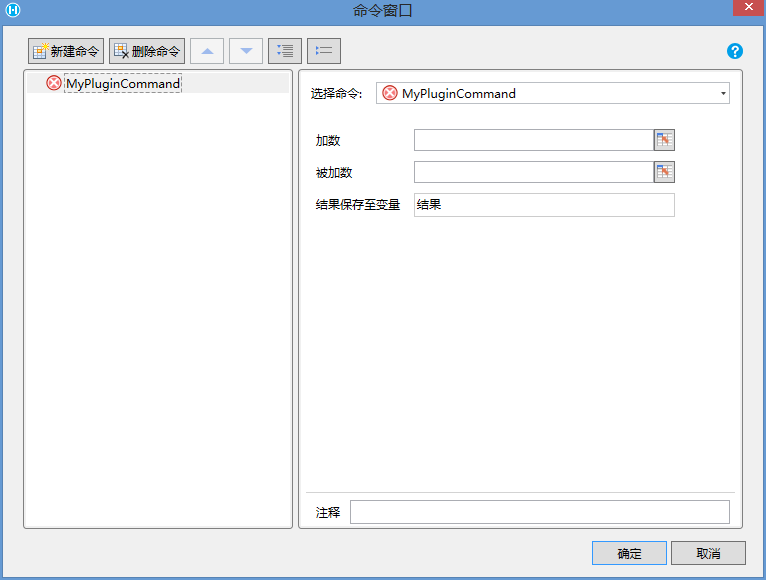
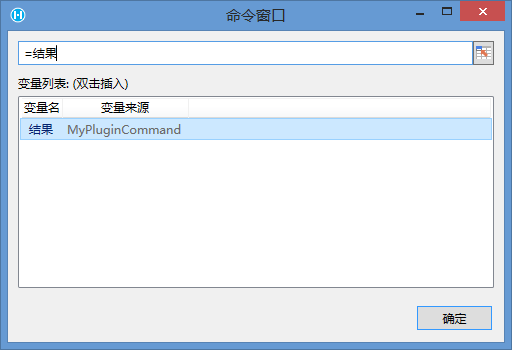
在后续命令编辑公式时,设置的变量可以直接在公式中使用
在JavaScript 部分,通过Forguncy.CommandHelper.setVariableValue方法设置结果到结果变量
javascript
class MyPluginCommand extends Forguncy.Plugin.CommandBase{
    execute() {
        const add1 = this.evaluateFormula(this.CommandParam.FirstValue);
        const add2 = this.evaluateFormula(this.CommandParam.LastValue);
        const res = Number(add1) + Number(add2);
        Forguncy.CommandHelper.setVariableValue(this.CommandParam.Result, res);
    }
}

Forguncy.Plugin.CommandFactory.registerCommand("MyPlugin.MyPluginCommand, MyPlugin", MyPluginCommand);
把返回结果设置到单元格上
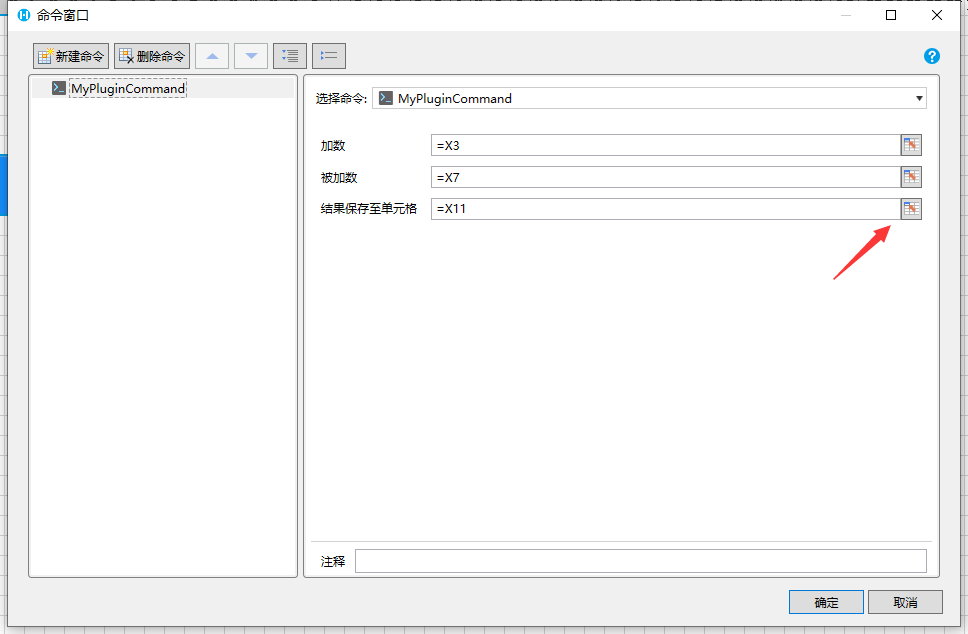
通过标注[FormulaProperty(OnlySupportNormalCell = true)] 可以让属性只能选择一个单元格
csharp
    public class MyPluginCommand : Command
    {
        [DisplayName("加数")]
        [FormulaProperty]
        public object FirstValue { get; set; }

        [DisplayName("被加数")]
        [FormulaProperty]
        public object LastValue { get; set; }

        [FormulaProperty(OnlySupportNormalCell = true)]
        [DisplayName("结果保存至单元格")]
        public object Result { get; set; } = "结果";
    }
设计器中的效果
在JavaScript 部分,通过setValue方法设置单元的值
javascript
class MyPluginCommand extends Forguncy.Plugin.CommandBase {
    execute() {
        const add1 = this.evaluateFormula(this.CommandParam.FirstValue);
        const add2 = this.evaluateFormula(this.CommandParam.LastValue);
        const res = Number(add1) + Number(add2);
        const location = Forguncy.Helper.getCellLocation(this.CommandParam.Result, this.getFormulaCalcContext());
        Forguncy.Page.getCellByLocation(location).setValue(res);
    }
}
Forguncy.Plugin.CommandFactory.registerCommand("MyPlugin.MyPluginCommand, MyPlugin", MyPluginCommand);
把返回结果设置到单元格上或者生成一个变量
强制给结果单元格生成Dom
使用以上代码可以把命令执行结果设置到单元格上。不过有一个前提,单元格必须有对应的Dom来展示单元格的值。默认情况下,活字格是不会给空白单元格生成Dom的,如果用户选择了空白单元格来接受命令结果会导致结果无法显示。为了解决这个问题,可以通过实现 IForceGenerateCell 接口告诉活字格强制生成 Dom
csharp
    public class MyPluginCommand : Command, IForceGenerateCell
    {
        [DisplayName("加数")]
        [FormulaProperty]
        public object FirstValue { get; set; }

        [DisplayName("被加数")]
        [FormulaProperty]
        public object LastValue { get; set; }

        [FormulaProperty(OnlySupportNormalCell = true)]
        [DisplayName("结果保存至单元格")]
        public object Result { get; set; } = "结果";

        public IEnumerable<GenerateCellInfo> GetForceGenerateCells()
        {
            if (Result is IFormulaReferObject targetReferObject)
            {
                var cellInfo = targetReferObject.GetGenerateCellInfo();
                if (cellInfo != null)
                {
                    yield return cellInfo;
                }
            }
        }
    }
更新: 2024-05-29 08:20:22
原文: https://www.yuque.com/robert-bh51n/ea8l6c/iuvcz6i9fr7banx8