Appearance
命令属性
在命令中包含另一个命令的情况并不常见。但是有些情况确实需要它。例如
- 执行命令的命令时弹出通知栏,点击通知栏的时候需要跳转到表单页面。
- 执行命令的时候需要弹出确认对话框,等点击确认或取消时又要分别执行不同的命令
以上情况就可能用到命令属性。当然,有时也会用定义子命令功能实现相同的效果,两种方式在功能和体验上略有差别,在本章节的最后会有专门的比较。
希望通过命令对话框编辑,可以通过标注CustomCommandObjectAttribute 的方式设置。
注意,标注CustomCommandObjectAttribute的属性类型必须是 object
csharp
    public class MyPluginCommand : Command
    {
        [CustomCommandObject]
        [DisplayName("点击通知命令")]
        public object ClickNoticeCommand { get; set; }
    }
在设计器中效果如下
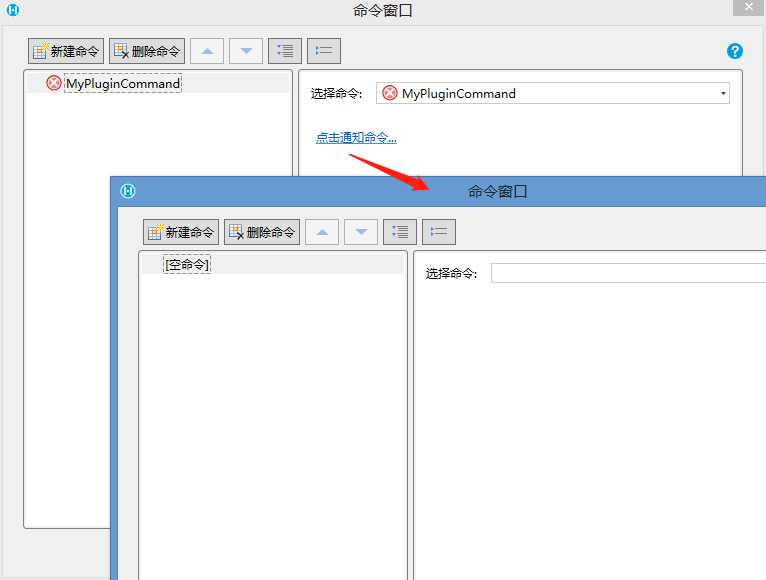
对应的JavaScript处理代码, 使用 executeCustomCommandObject 方法执行命令属性中的命令
javascript
class MyPluginCommand extends Forguncy.Plugin.CommandBase{
    execute() {
        const noticeDiv = $("<div style='width: 300px;top:-300px;right:20px;background:#FBF3DB;position:absolute;padding:10px'>有新的任务需要处理!<br>点击处理<div>");
        $(document.body).append(noticeDiv);
        noticeDiv.animate({ top: '10px' }, 300);
        noticeDiv.click(() => {
            const command = this.CommandParam.ClickNoticeCommand;
            this.executeCustomCommandObject(command); // 执行命令中定义的单击命令
        });
        setTimeout(() => {
            noticeDiv.animate({ top: '-300px' }, 200, () => {
                noticeDiv.remove();
            });
        }, 3000);
    }
}

Forguncy.Plugin.CommandFactory.registerCommand("MyPlugin.MyPluginCommand, MyPlugin", MyPluginCommand);
如果需要更细致的控制,可以通过CustomCommandObjectAttribute的其他属性来控制
- 支持上下文参数
- 设置CustomCommandObjectAttribute 的 InitParamValues 和 InitParamProperties 属性,多个上下文变量可以用“|”分隔
- 代码
csharp
    public class MyPluginCommand : Command
    {
        [CustomCommandObject(InitParamProperties = "context", InitParamValues = "上下文")]
        public object ClickNoticeCommand { get; set; }
    }
3. 设计器效果
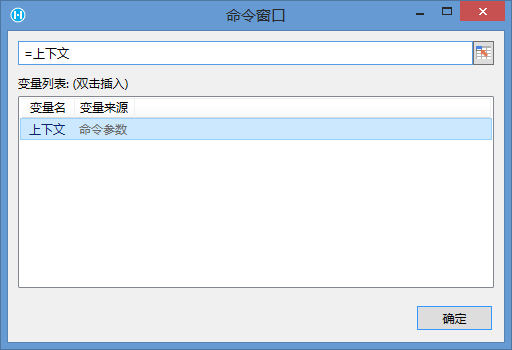 4. JavaScript 添加上下文参数处理
javascript
class MyPluginCommand extends Forguncy.Plugin.CommandBase{
    execute() {
        const noticeDiv = $("<div style='width: 300px;top:-300px;right:20px;background:#FBF3DB;position:absolute;padding:10px'>有新的任务需要处理!<br>点击处理<div>");
        $(document.body).append(noticeDiv);
        noticeDiv.animate({ top: '10px' }, 300);
        noticeDiv.click(() => {
            const command = this.CommandParam.ClickNoticeCommand;
            const initPrarm = {};
            initPrarm[command.ParamProperties["context"]] = "MyContext";// 设置上下文值
            this.executeCustomCommandObject(command, initPrarm); // 执行命令中定义的单击命令
        });
        setTimeout(() => {
            noticeDiv.animate({ top: '-300px' }, 200, () => {
                noticeDiv.remove();
            });
        }, 3000);
    }
}

Forguncy.Plugin.CommandFactory.registerCommand("MyPlugin.MyPluginCommand, MyPlugin", MyPluginCommand);- 上下文参数支持添加描述,
- 设置CustomCommandObjectAttribute 的 ParameterDescriptions 属性
- 代码
csharp
    public class MyPluginCommand : Command
    {
        [CustomCommandObject(InitParamProperties = "context", InitParamValues = "上下文",
                            ParameterDescriptions = "context:可以在上下文中包含了对应数据的ID")]
        public object ClickNoticeCommand { get; set; }
    }
3. 设计器效果
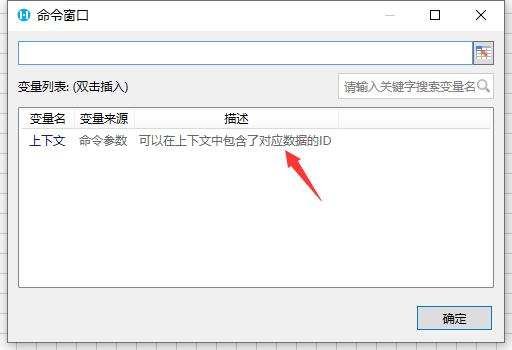 4. 说明 1. 添加适当的描述可以帮助用户更好的理解上下文变量的意义 2. 可以只给部分上下文变量添加注释 3. 本特性要求活字格版本大于等于9.0.100.0
更新: 2023-09-16 15:18:34
原文: https://www.yuque.com/robert-bh51n/ea8l6c/gnrl4mm61iq4ixdc