Appearance
布尔属性
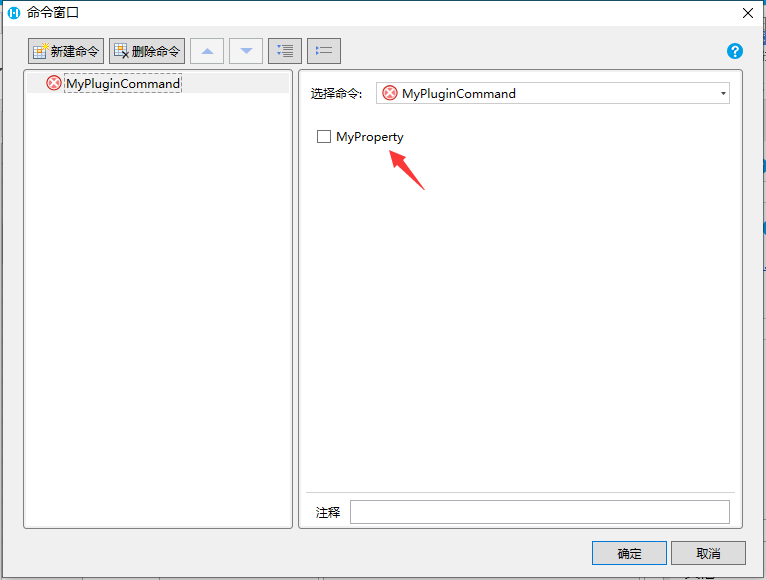
默认情况下,如果一个属性的类型是 bool 那么这个属性会被自动识别为整数属性,不需要做任何额外的事情
csharp
    public class MyPluginCommand : Command
    {
        public bool MyProperty { get; set; }
    }
在设计器中效果如下
如果需要更细致的控制,需要使用 BoolPropertyAttribute 标注来控制
注意,标注BoolPropertyAttribute的属性类型必须是 bool
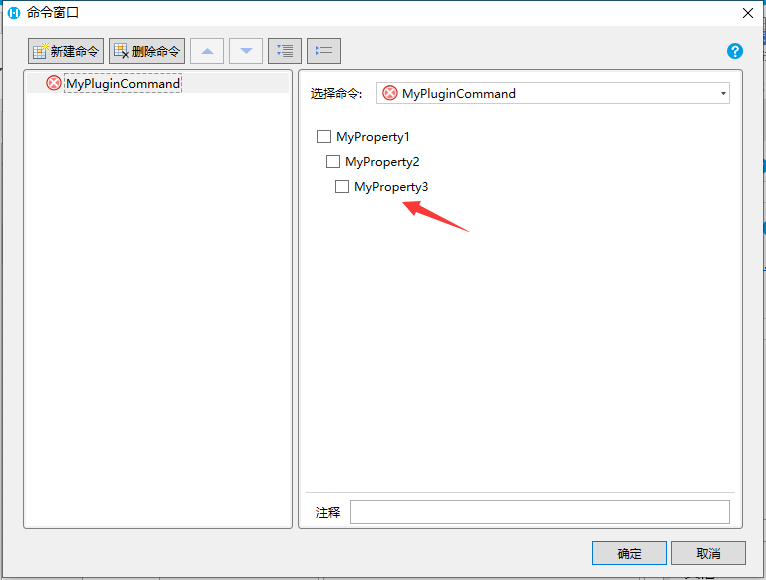
- Bool属性生成的复选框在不同场景下需要控制不同缩进级别,使得在多个属性直接看起来更有层次结构
- 可以设置BoolProperty 的 IndentLevel 属性控制缩进等级
- 代码
csharp
    public class MyPluginCommand : Command
    {
        [BoolProperty(IndentLevel = 0)]
        public bool MyProperty1 { get; set; }

        [BoolProperty(IndentLevel = 1)]
        public bool MyProperty2 { get; set; }

        [BoolProperty(IndentLevel = 2)]
        public bool MyProperty3 { get; set; }
    }
3. 效果
 4. 其他说明
如果标注了 BoolProperty 属性,但是没有设置缩进等级,则默认缩进等级为 0
注意:
如果Bool属性的默认值是 True,必须要添加DefaultValue标注,否则会出现属性无法保存的问题
csharp
    public class MyPluginCommand : Command
    {
        [DefaultValue(true)]
        public bool MyProperty { get; set; } = true;
    }
更新: 2022-11-28 09:58:01
原文: https://www.yuque.com/robert-bh51n/ea8l6c/axkpmu2e6ivzmbos