Appearance
支持结构类型的返回结果
从章节支持返回结果中,我们已经了解到,通过给属性标注ResultToPropertyAttribute, 可以在命令执行后生成一个或多个返回结果,以便后续命令使用。
如果希望生成复杂的对象类型返回结果,或者生成数组类型的返回结果,通过标注ResultToPropertyAttribute,也是可以实现的,但是再后续的属性提示中,用户无法快捷的了解返回的对象有哪些子属性。只能通过点操作符硬取值。
例如一下代码
csharp
using GrapeCity.Forguncy.Commands;
using GrapeCity.Forguncy.Plugin;
using GrapeCity.Forguncy.ServerApi;
using System.ComponentModel;
using System.Threading.Tasks;

namespace MyPlugin
{
    public class MyPluginServerCommand : Command, ICommandExecutableInServerSideAsync
    {
        [FormulaProperty]
        [DisplayName("学生Id")]
        public object StudentId { get; set; }

        [ResultToProperty]
        [DisplayName("查询结果")]
        public string ResultTo { get; set; } = "结果";

        public async Task<ExecuteResult> ExecuteAsync(IServerCommandExecuteContext dataContext)
        {
            var id = await dataContext.EvaluateFormulaAsync(this.StudentId);
            var studentInfo = dataContext.DataAccess.GetTableData("学生表", new ColumnValuePair()
            {
                ColumnName = "ID",
                Value = id
            });

            dataContext.Parameters[ResultTo] = studentInfo;
            return new ExecuteResult();
        }

        public override CommandScope GetCommandScope()
        {
            return CommandScope.ExecutableInServer;
        }
    }
}
对象类型返回值
假设,命令执行后,会返回学生对象。包含了姓名和年龄属性,但是再后续命令使用结果时只会提示,结果变量,而如果需要获取子属性值,必须用户手动,准确输入,用户体验较差。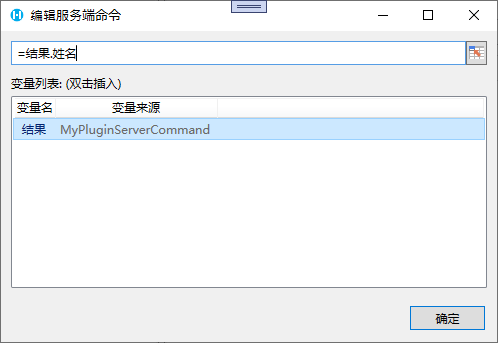
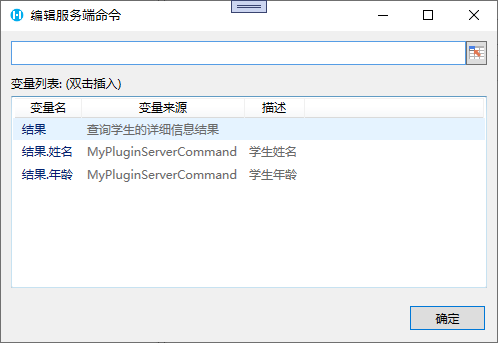
如果希望同时提示子属性,可以通过实现 IServerCommandParamGenerator 接口实现
csharp
using GrapeCity.Forguncy.Commands;
using GrapeCity.Forguncy.Plugin;
using GrapeCity.Forguncy.ServerApi;
using System.Collections.Generic;
using System.ComponentModel;
using System.Threading.Tasks;

namespace MyPlugin
{
    public class MyPluginServerCommand : Command, ICommandExecutableInServerSideAsync, IServerCommandParamGenerator
    {
        [FormulaProperty]
        [DisplayName("学生Id")]
        public object StudentId { get; set; }

        [ResultToProperty]
        [DisplayName("查询结果")]
        public string ResultTo { get; set; } = "结果";

        public IEnumerable<GenerateParam> GetGenerateParams()
        {
            yield return new GenerateObjectParam()
            {
                ParamName = this.ResultTo,
                Description = "查询学生的详细信息结果",
                ParamScope = CommandScope.All,
                SubPropertiesDescription = new Dictionary<string, string>() {
                    { "姓名","学生姓名"},
                    { "年龄","学生年龄"}
                }
            };
        }
        public async Task<ExecuteResult> ExecuteAsync(IServerCommandExecuteContext dataContext)
        {
            var id = await dataContext.EvaluateFormulaAsync(this.StudentId);
            var studentInfo = dataContext.DataAccess.GetTableData("学生表", new ColumnValuePair()
            {
                ColumnName = "ID",
                Value = id
            });

            dataContext.Parameters[ResultTo] = studentInfo;
            return new ExecuteResult();
        }

        public override CommandScope GetCommandScope()
        {
            return CommandScope.ExecutableInServer;
        }
    }
}
效果如下
数组类型返回值
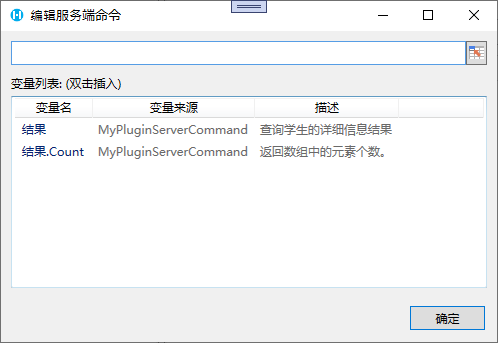
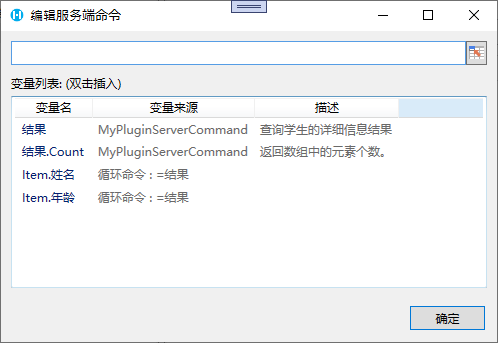
如果返回值是列表类型,同样可以通过实现IServerCommandParamGenerator解决
csharp
using GrapeCity.Forguncy.Commands;
using System.Collections.Generic;
using System.ComponentModel;
using System.Threading.Tasks;

namespace MyPlugin
{
    public class MyPluginServerCommand : Command, ICommandExecutableInServerSideAsync, IServerCommandParamGenerator
    {
        [ResultToProperty]
        [DisplayName("查询结果")]
        public string ResultTo { get; set; } = "结果";

        public IEnumerable<GenerateParam> GetGenerateParams()
        {
            yield return new GenerateListParam()
            {
                ParamName = this.ResultTo,
                Description = "查询学生的详细信息结果",
                ParamScope = CommandScope.All,
                ItemProperties = new List<string>() {
                    "姓名",
                    "年龄"
                }
            };
        }
        public async Task<ExecuteResult> ExecuteAsync(IServerCommandExecuteContext dataContext)
        {
            var studentInfos = dataContext.DataAccess.GetTableData("学生表");
            dataContext.Parameters[ResultTo] = studentInfo;
            return new ExecuteResult();
        }

        public override CommandScope GetCommandScope()
        {
            return CommandScope.ExecutableInServer;
        }
    }
}
效果如下
在普通命令中使用时
在循环命令的子命令中使用时
更新: 2023-11-27 12:26:00
原文: https://www.yuque.com/robert-bh51n/ea8l6c/hy8wdltsyopyazhy